SRS Airbag
Side air bag (satellite) sensor
In this manual: SRS Airbag
~1min read
Exploded View
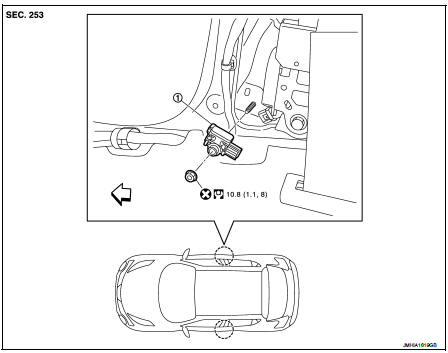
1. Satellite sensor
 : Vehicle front
 : Do not reuse
 : N·m (kg-m, ft-lb)
Removal and Installation
WARNING:• Before servicing, turn ignition switch OFF, disconnect battery negative terminal and wait 3 minutes or more.
• Never use the air tools or electric tools for servicing.
REMOVAL
1. Remove the center pillar lower garnish. Refer to INT-20, "CENTER PILLAR LOWER GARNISH : Removal and Installation".2. Remove the side air bag (satellite) sensor fixing nut (A), and then pull the side air bag (satellite) sensor (1).
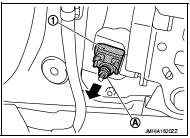
3. Disconnect the harness connector and then remove the side air bag (satellite) sensor.
CAUTION:• Never impact the side air bag (satellite) sensor.
• Replace the side air bag (satellite) sensor if it has been dropped or sustained an impact.
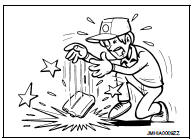
• Replace the side air bag (satellite) sensor of deployed SRS front side air bag module and deployed SRS side curtain air bag module.
INSTALLATION
Note the following items, and then install in the reverse order of removal.
CAUTION:• Never use the old fixing nut after removal, replace with the new nut. • Never damage the harness while installing. • Always install normally aligning to the cutout hole, because performance of the side air bag (satellite) sensor excessively fluctuates according to the installation position. • If malfunction is detected by the air bag warning lamp, after repair or replacement of the malfunctioning parts, reset the memory using self-diagnosis or CONSULT-III. Refer to SRC-12, "On Board Diagnosis Function" or SRC-16, "CONSULT-III Function".
• After the work is completed, check that no system malfunction is detected by air bag warning lamp
Was this page helpful?