Rear fog light, Cruise control, Triple-Info-Display, Graphic-Info-Display, Color- Info-Display
Rear fog light
 illuminates yellow.
Illuminated when the rear fog light.
Cruise control
 illuminates or flashes
green.
Illuminates when the system.
FlashesCruise control was enabled without depressing the brake pedal beforehand.
Triple-Info-Display
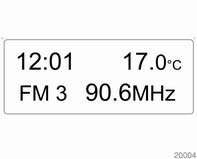
Triple-Info-Display Displays time, outside temperature and date or Infotainment system (when it is on).
When the ignition is off, the time, date and outside temperature can be displayed by briefly pressing one of the two buttons below the display.
Graphic-Info-Display, Color- Info-Display
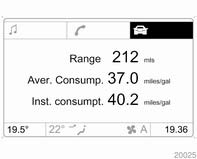
Graphic-Info-Display, Color- Info-Display Displays time, outside temperature, date or Infotainment system (when it is on) and electronic climate control system information. The Color-Info-Display displays the information in colour.
The type of information and how it is displayed depends on the equipment of the vehicle and the settings made.
Selecting functions Functions and settings of the Infotainment system and electronic climate control system are accessed via the display.Selections are made via the menus and buttons, the multifunction control of the Infotainment system or the left adjuster wheel of the steering wheel.
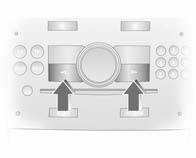
Selecting with the Infotainment system buttons Select menu items via the menus and using the Infotainment system buttons. The OK button is used to select the highlighted item or confirm a command.
To exit a menu, press the right or left arrow button until Return or Main appear and select.
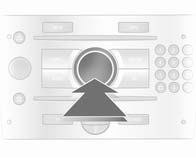
Selecting with the multifunction control Turn the multifunction control to highlight menu items or commands and to select function areas. Press the multifunction control to select the highlighted item or confirm a command.
To exit a menu, turn the multifunction control until Return or Main appears and select.
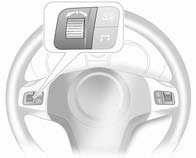
Selecting with the left adjuster wheel on the steering wheel Turn to select a menu item.
Press the adjuster wheel to select the highlighted item or confirm a command.
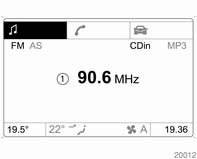
Function areas
For each function area there is a main page (Main), which is selected at the top edge of the display (not with the Infotainment system CD 30 or the handsfree mobile phone system): ■ Audio,
■ Navigation,
■ Telephone,
■ Trip computer.
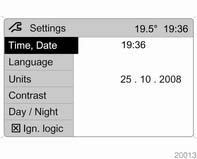
System settings Press the Main button of the Infotainment system.
Press the Settings button on the Infotainment system. For Infotainment system CD 30, no menu may be selected.
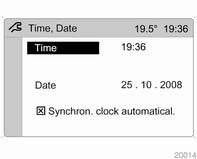
Setting date and time Select menu item Time, Date from the Settings menu. Select the required menu items and make settings. Automatic time synchronisation The RDS signal of most VHF transmitters automatically sets the time.
Some transmitters do not send a correct time signal. In such cases, we recommend switching off automatic time synchronisation.
On Infotainment systems with navigation, time and date are also harmonised upon receipt of a GPS satellite signal.The function is activated by highlighting the field in front of Synchron. clock automatical. in the Time, Date menu.
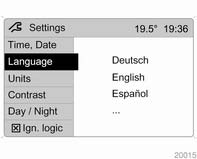
Language selection The display language for some functions can be selected. Select menu item Language from the Settings menu.
Select the desired language.
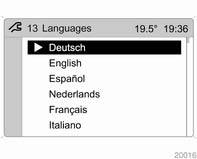
Selection is indicated by a

in front
of the menu item.
In systems with voice output, when the language setting of the display is changed the system will ask whether the announcement language should also be changed - see Infotainment system manual.
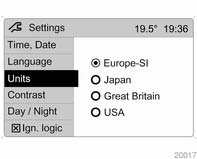
Setting units of measure Select menu item Units from the Settings menu. Select the desired unit.
Selections are indicated by a 
in
front of the menu item.
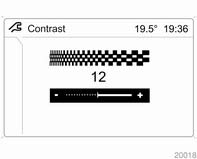
Adjusting contrast
(Graphic-Info-Display) Select menu item Contrast from the Settings menu.
Confirm the required setting.
Setting display modeDisplay brightness is dependent on vehicle lighting. Additional settings can be made as follows:
Select menu item Day / Night from the Settings menu.
Automatic: The colours are adapted to the exterior lights.
Always day design: black or coloured text on light background.
Always night design: white or coloured text on dark background.Selection is indicated by a o in front of the menu item.
Ignition logicSee Infotainment system manual.
Test yourself
A quick Opel Corsa quiz: every answer comes with an explanation and a link to the manual page.