Battery voltage, Brake light switch, Drain diesel fuel filter, Lighting, Trip computer
Battery voltage
Low battery voltage in the radio remote control. On vehicles without check control, the message InSP3 appears in the instrument panel display. Replace the battery.
Brake light switch
Brake light does not come on during braking. Have the cause of the fault remedied immediately by
a workshop.
Drain diesel fuel filter
If there is water in the diesel fuel filter, the message InSP4 appears in the instrument panel display. Consult a workshop.
Lighting
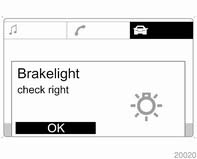
Important exterior lighting lamps, including cables and fuses, are monitored. In trailer mode, trailer lighting is also monitored. Trailers with LED lighting must have an adapter that enables lamp monitoring as with conventional bulbs.
Lighting
The failed lighting will be indicated in the information display or the message InSP2 will appear in the instrument panel display.
Trip computer
Trip computer
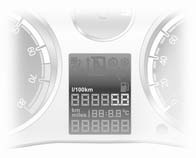
The trip computer provides information on driving data, which is continually recorded and evaluated electronically.
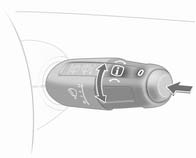
The functions can be selected via the buttons on the wiper lever. Turn the adjuster wheel to select: ■ Range. ■ Instantaneous consumption. ■ Distance travelled. ■ Average speed. ■ Absolute consumption. ■ Average consumption.
■ Stop watch.
Range Range is calculated from current fuel tank content and instantaneous consumption. The display shows average values. After refuelling, the range is updated automatically after a brief delay. When the fuel level in the tank is low, a message appears on the display.Confirm the warning message by pressing  on the wiper lever.
Instantaneous consumption
Display of the instantaneous consumption. At low speeds, consumption per hour is displayed.
Distance travelledDisplay of distance travelled.
Average speed Display of average speed.Stoppages in the journey with the ignition off are not included in the calculations.
Absolute consumptionDisplay of fuel consumed.
Average consumptionDisplay of average consumption.
Stop watch Measurement of the time from activation to deactivation.Press the  button to start and
stop
the measurement.
■ Average speed,
■ Absolute consumption, ■ Average consumption. Select the desired function. To reset a value to zero, hold down the button 7 for more than three seconds.
To reset all functions, hold down the button 7 for more than 6 seconds.
Test yourself
A quick Opel Corsa quiz: every answer comes with an explanation and a link to the manual page.