Learning
Essential equipment |
| diagnostic tool |
New parts are not coded. Once fitted to the vehicle, learn a code to the replaced parts to make them operational.
Some immobiliser system parts must already be coded (to the vehicle code).
See assignment table.
WARNINGIf a part learns a code, it is permanently assigned to the vehicle.
The learnt code cannot be erased.
Assignment table
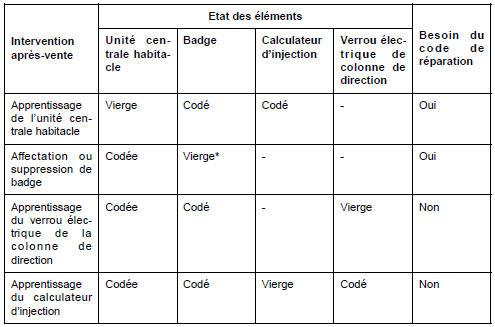
* The card assigned to the vehicle must be blank or already learnt on this vehicle.
Note: A card can be learnt by the vehicle but not be operational (not assigned).WARNING: A card not presented during assignment will no longer be functional.
I - PASSENGER COMPARTMENT CENTRAL UNIT LEARNING PROCEDURE
- Switch on the sidelights.
- Enter the serial number using the diagnostic tool.
- Perform the "Multiplex network test".
- Select the "Multiplex network result" icon.
- Select the tab:
- "information", then
- "passenger compartment central unit", then
- "diagnose".
- Select the icon:
- "repair", then
- "learning".
- Run command SC004 "Passenger compartment central unit learning".
- The tool displays "Enter the after-sales code".
- Remove the card from the card holder.
- Click "Next".
- Place the card away from the card holder.
- Enter the repair code.
Note: The code consists of 12 uppercase hexadecimal characters.
- Confirm.
Once a passenger compartment control unit has learned the card codes, it is impossible to erase them or to store a different code in their place.
- If the code format is correct, the tool displays "Insert the card fully into the card holder".
- Insert a card belonging to the vehicle.
Note: This procedure cannot be performed with a blank card.
- Confirm.
- The tool displays "Learning in progress".
Do not remove the card until the following message appears: "One card learned".
Note: This step may take a few seconds.
- The tool displays "Learning complete. Start the card assignment procedure".
- Between each operation, the maximum delay is 5 minutes. If this delay is exceeded, the procedure is cancelled. Once a card has been presented, the passenger compartment control unit is no longer blank.
- The passenger compartment control unit is now coded. It is now necessary to enter card learning mode to assign the other cards (four maximum).
- Perform card learning.
- Perform the passenger compartment control unit configurations and the tyre pressure monitoring system valve learning.
- Enter the multiplexed network topology
II - RENAULT CARD LEARNING AND ASSIGNMENT PROCEDURE
WARNINGIf not all cards are available, a reassignment procedure must be carried out afterwards with all the cards.
- Select the "Repair" icon.
- Select the "Learning" icon.
- Run command SC006 "Card assignment".
- The tool displays "Remove the card from the card holder".
- Click "Next".
- The tool displays "Warning: cards learned before the current procedure will be permanently deactivated after learning the first card. Caution: do not forget to present all the cards to be assigned to the vehicle during learning".
- Click "Next".
- The tool displays "Enter the after-sales code".
- Enter the repair code.
Note: The code consists of 12 uppercase hexadecimal characters.
- Confirm.
- If the code format is correct, the tool displays "Insert the card fully into the card holder".
- Insert a blank card or a card belonging to the vehicle.
- Confirm.
- The tool displays "Learning in progress".
Do not remove the card until the following message appears: "Number of cards learned = 1".
- The tool displays "Do you want to learn another card?".
Note: The vehicle can have a maximum of four cards.
1 - To assign another card:
- Select "Yes".
- The tool displays "Remove the card from the card holder".
- Remove the card from the card holder.
- The tool displays "Insert the card fully into the card holder".
- Insert another blank card or a card belonging to the vehicle.
- Confirm.
2 - To finish learning:
- Select "No".
- Confirm.
- The tool displays "Writing data to memory", then "End of test".
- Check vehicle starting and door locking with all cards.
- Check the operation of the hands-free cards.
- Between each operation, the maximum delay is 5 minutes. If this delay is exceeded, the procedure is cancelled.
- If only one card has been presented, only that card will work.
- If no card has been presented, the old cards will work.
3 - Remote control specifics:
- Synchronisation of radio frequency remote controls is not required; it is performed each time the ignition is switched on.
Test yourself
A quick Renault Megane quiz: every answer comes with an explanation and a link to the manual page.