Driving information display
Display contents
The driving information display shows a wide variety of driving data useful to the driver, including the current outside air temperature.
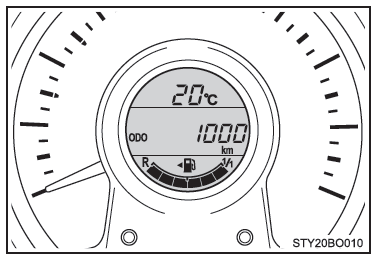
- Outside temperature display
- Trip information
Displays the driving range, fuel consumption and other cruising information - Instrument panel brightness control
- Gear position (vehicles with multi-mode manual transmission)
Displays the selected gear position - Speed limiter display (if equipped)
Trip information
■ Changing the display You can switch between displayed items by pressing either of the "DISP" buttons.
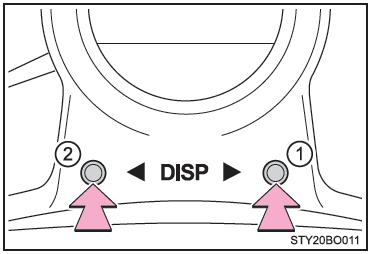
- Next
- Back
■ Odometer Displays the total distance the vehicle has traveled.
■ Trip meters "A" and "B" Displays the distance the vehicle has traveled since the trip meter was last reset. Trip meters "A" and "B" can be used to record and display different distances independently.
Pressing and holding either of the "DISP" buttons will reset the trip meter currently displayed.
■ Smart stop & start system operating time (if equipped)
- Displays the total time the engine has been stopped by the smart stop & start system during the current trip.
Vehicles without the smart entry and start system: From the moment the engine switch is changed from the "ON" position to the "LOCK" position.
Vehicles with the smart entry and start system: From the moment the engine switch is changed from IGNITION ON mode to the off position.- Press either of the "DISP" buttons to return to the previous screen.
- Method of switching the automatically displayed smart stop & start system operating time function between enabled and disabled.
■ Total smart stop & start system operating time (if equipped) Displays the total time the engine has been stopped by the smart stop & start system since the system was last reset.
To reset, press either of the "DISP" buttons.
■ Outside temperature (except vehicles with manual transmission and 1KR engine) Displays the outside air temperature.
■ Current fuel consumption Displays the current fuel consumption value.
■ Average fuel consumption Displays the average fuel consumption since the last reset.
- This function can be reset by pressing either "DISP" button for more than 1 second while the average fuel consumption is displayed.
- Use the average fuel consumption as a reference.
■ Driving range Displays the estimated maximum distance that can be driven with the remaining fuel.
- This distance is calculated based on the average fuel consumption.
Therefore, the actual distance you can drive may differ from the displayed distance.
■ Average vehicle speed Displays the average vehicle speed since the function was last reset.
This function can be reset by pressing either "DISP" button for more than 1 second while the average vehicle speed is displayed.
■ Instrument panel brightness control Displays the instrument panel brightness control screen.
- This screen appears only when the tail lights are on.
- You can adjust the brightness of the instrument panel lights.
Customizing the stop & start system operating time display (if equipped)
The automatically displayed stop & start system operating time function can be turned on or off.
- With the vehicle stopped, press the "DISP" buttons to display the stop & start system operating time.
- Press and hold the "DISP" buttons for 5 seconds.
- Press the "DISP" buttons to turn the setting on or off.
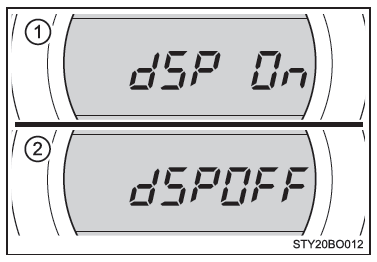
- On
- Off
The screen will return to the previous display after 6 seconds, or if you press and hold either "DISP" button for 2 seconds.
Instrument panel brightness control
- With the tail lights on and the vehicle stopped, press either "DISP" button to display the instrument panel brightness control.
- Press and hold either "DISP" button until the instrument panel brightness control display starts flashing.
- Press either "DISP" button.
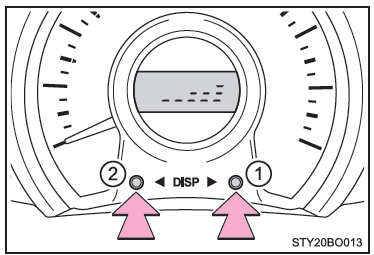
- Brighter
- Darker
The brightness level can be set by pressing and holding either "DISP" button, by turning off the tail lights, or it will be set automatically 6 seconds after the last button press.
■ When the battery terminals are disconnected and reconnected The following information data will be reset:
- Trip meters "A" and "B"
- Total stop & start system operating time (if equipped)
- Average fuel consumption
- Average vehicle speed
■ Liquid crystal display Small or bright dots may appear on the display. This is a characteristic of liquid crystal displays, and the display can continue to be used without any problem.
WARNING
■ Information display at low temperatures (vehicles with multi-mode manual transmission) Wait for the cabin to warm up before using the liquid crystal display.
At extremely low temperatures, the multi-information display may respond slowly and display changes may be delayed.
For example, there is a time lag between when the driver shifts gears and when the new gear number appears on the display.
This delay may cause the driver to downshift again, resulting in sudden and excessive engine braking and, in some cases, accidents that may cause serious or fatal injury.
■ Precautions when setting the display As the engine must be running while the display is being set, make sure the vehicle is parked in a safe place with adequate ventilation. In an enclosed space, such as a garage, carbon monoxide (CO), a toxic gas contained in exhaust fumes, may accumulate and enter the cabin. This may cause serious health problems or death.
NOTE
■ Information display at low temperatures (vehicles with manual transmission) Wait for the cabin to warm up before using the liquid crystal display.
At extremely low temperatures, the multi-information display may respond slowly and display changes may be delayed.
Test yourself
A quick Toyota Aygo quiz: every answer comes with an explanation and a link to the manual page.