Settings display
The following options can be customized.
For functions that can be turned on or off, they switch between on and off each time you press .
 LDA (Lane Departure Alert)
Select to set up the following options.
Active steering assist on/off
Alert sensitivity
Lane wandering alert on/off
Lane wandering sensitivity
 PCS (Pre-Collision System)
Select to set up the following options.
PCS system on/off
PCS system sensitivity
 BSM (Blind Spot Monitor)
Select to set up the following options.
- BSM function on/off
- RCTA* function on/off
*: The RCTA function can only be turned on or off when the BSM function is on.
 Toyota Parking Assist-sensor
Select to turn the Toyota parking sensor assist on/off.
 RSA (Road Sign Assist)
Select to set up the RSA (Road Sign Assist).
Selecting the drive mode
 Instrument cluster illumination
Select to adjust the brightness of the instrument cluster illumination.
Vehicle settings
Select the menu to set up the following options.
 RSA (Road Sign Assist) setup
 Stop & Start system setup
 Tire pressure warning system setup
Meter settings
Select the menu to set up the following options.
Language
Select to change the display language.Units
Select to change the fuel consumption unit of measurement. Eco driving indicator setup*1
Select to turn the eco driving indicator on/off.Trip Information 1 to 3
Select to choose up to 2 items to display on a trip information screen. Up to 3 trip information screens can be set up.Contextual displays
Select to turn the contextual displays*2 on/off. These may appear in certain situations.Default settings
Meter settings that have been programmed or changed will be deleted or returned to their default values.
*1: On equipped models
*2: Stop & Start system operating time display (on equipped models), navigation system route guidance display (on equipped models), and phone incoming call display of the hands-free phone system (on equipped models).
■ Contextual displays In certain situations, such as when you press a button, contextual information is temporarily shown on the multi-information display.
You can turn the contextual display function on or off.
■ Automatic cancellation of the setup display In the following situations, the setup display used to set functions with the meter control switch is automatically cancelled.
- If a warning message appears while the setup display is shown
- When the vehicle starts moving while the setup display is shown
■ Liquid crystal display Small spots or light halos may appear on the screen. This is normal for a liquid crystal display, and there is no problem continuing to use it.
■ When the battery terminals are disconnected and reconnected The trip information is reset.
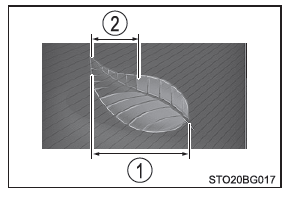
■ Eco driving range indicator (on equipped models) Shows the eco driving range and eco driving level according to acceleration.
- Eco driving range
- Eco driving ratio based on acceleration
If the vehicle operates outside the eco driving range, the green area disappears and the eco driving indicator turns off.
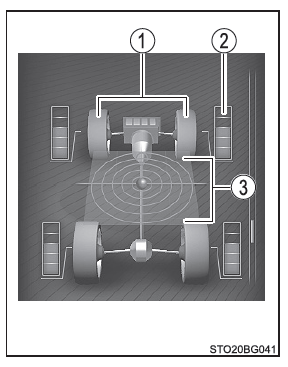
■ Dynamic torque control 4WD system display (4WD models)
Shows the operating status of the Dynamic Torque Control 4WD system, the front wheel steering (angle), and the status of the acceleration forces.
- Front wheel steering display Shows the estimated steering angle of the front wheels.
- Torque distribution display Shows the amount of engine torque being applied.
- Acceleration force display Shows the real-time status of the acceleration forces.
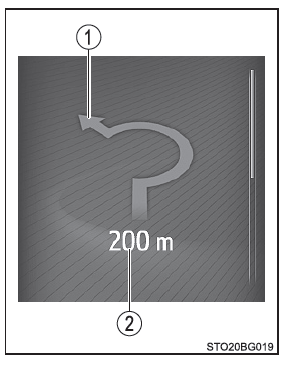
■ Arrow guidance navigation (vehicles with navigation system)
Arrow guidance navigation information is only displayed when the navigation system is actually providing route guidance. As you approach a turn, the system shows the distance to the turn and the direction of the turn.
- Direction of turn
The image shown may differ from the actual intersection. - Distance to next turn
■ Display when the systems are switched off When you turn the ignition switch off, each of the following items is shown on the multi-information display, then turns off after about 30 seconds.
- Elapsed time
- Distance
- Average fuel consumption
■ Information display in cold weather Let the vehicle cabin warm up before using the multi-information liquid crystal display. In extremely low temperatures, the driving monitor screen may respond slowly and display updates may be delayed.
For example, there is a delay between the moment the driver shifts gears and the moment the corresponding gear is shown on the display. This delay may lead the driver to downshift again, causing a sudden and excessive deceleration due to engine braking, and possibly an accident that could result in serious or fatal injuries.
■ Precautions when adjusting the display Since the engine must be running to adjust the display, make sure the vehicle is parked in a well-ventilated area. In an enclosed space such as a garage, harmful carbon monoxide (CO) in the exhaust gas may build up and enter the passenger compartment. This could result in serious health problems or death.
NOTE■ When adjusting the display To prevent the battery from discharging, make sure the engine is running while you adjust the display functions.