Displayed information
The multi-information display shows the driver a variety of vehicle-related information.
- Menu icons
Select an icon to display the following information. Some information may be displayed automatically depending on the situation.
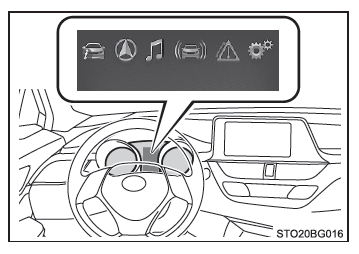
 Trip information
Select to display various trip-related information.
 Navigation-linked display (if equipped)
Select to display the following information linked to the navigation system.
Route guidance
Compass display (north up/heading up)
 Audio-linked display (if equipped)
Select to choose an audio source or music track on the screen using the meter control switches.
 Driving assist system information (if equipped)
Select to display the operating status of the following systems:
- LDA (Lane Departure Alert)
- Dynamic Radar Cruise Control
- All-speed dynamic radar cruise control
- RSA (Road Sign Assist)
 Warning message display
Select to display warning messages and the actions to take if a malfunction is detected.
 Settings display
Select to set the instrument display and the use of certain vehicle functions.
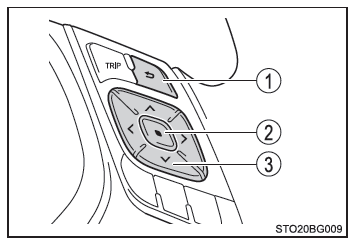
Using the meter control switches
Use the meter control switches to operate the multi-information display.
- Return to previous screen
- Confirm/set
- Select an item/change pages