Interior features
Bluetooth® phone message function
In this manual: Interior features
~1min read
Received messages can be forwarded from the connected Bluetooth® phone, enabling checking and replying using the multimedia system.
Depending on the type of Bluetooth® phone connected, received messages may not be transferred to the message inbox.
If the phone does not support the message function, this function cannot be used. Displaying “Message Inbox” screen 1 Press the “SETUP” button. 2 Select “Phone”.3 Select  .
When an e-mail/SMS/MMS is received, the incoming message screen pops up with sound and is ready to be operated on the screen.
1 Select to check the message. 2 Select to refuse the message.3 Select to call the message sender.
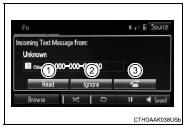
●The pop up screen is separately available for incoming e-mail and SMS/ MMS messages under the following conditions:
E-mail:
• “Incoming E-mail Display” is set to “Full Screen”.• “E-mail Notification Popup” is set to on.
SMS/MMS:
• “Incoming SMS/MMS Display” is set to “Full screen”.• “SMS/MMS Notification Popup” is set to on.
Test yourself
A quick Toyota Corolla quiz: every answer comes with an explanation and a link to the manual page.
Was this page helpful?