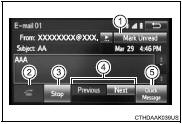
1 Display the “Message Inbox” screen. 2 Select the desired message from the list.
3 Check that the message is displayed.
1 E-mails: Select “Mark Unread” or “Mark Read” to mark mail unread or read on the message inbox screen.
This function is available when “Update Message Read Status on Phone” is set to on 2 Select to make a call to the sender. 3 Select to have messages read out. To cancel this function, select “Stop”. 4 Select to display the previous or next message.
5 Select to reply the message.
■Check the messages ●Depending on the type of Bluetooth® phone being connected, it may be necessary to perform additional steps on the phone.
●Messages are displayed in the appropriate connected Bluetooth® phone’s registered mail address folder.
Select the tab of the desired folder to be displayed.
●Only received messages on the connected Bluetooth® phone can be displayed. ●The text of the message is not displayed while driving. ●When “Automatic Message Readout” is set to on, messages will be automatically read out. ●Turn the “PWR/VOL” knob, or use the volume switch on the steering wheel to adjust the message read out volume.
●The message read out function is available even while driving.
?
Test yourself
A quick Toyota Corolla quiz: every answer comes with an explanation and a link to the manual page.