Interior features
Sound setting
In this manual: Interior features
~1min read
1 Display the “Phone/Message Settings” screen. 2 Select “Sound Settings” on the “Phone/Message Settings” screen.
1 Set the desired ringtone. 2 Adjust the ringtone volume. 3 Adjust the message readout volume. 4 Set the desired incoming SMS/MMS tone. 5 Adjust the incoming SMS/ MMS tone volume. 6 Set the incoming e-mail tone. 7 Adjust the incoming e-mail tone volume.8 Adjust the default volume of the other party's voice.
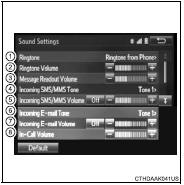
Select “Default”, and then “Yes”.
Test yourself
A quick Toyota Corolla quiz: every answer comes with an explanation and a link to the manual page.
Was this page helpful?