When the contact is empty
You can transfer the phone numbers in a Bluetooth® phone to the system.
Operation methods differ between PBAP (Phone Book Access Profile) compatible and PBAP incompatible Bluetooth® phones. If the cellular phone does not support either PBAP or OPP (Object Push Profile) service, you cannot transfer contacts.
■ For PBAP compatible Bluetooth® phones► When “Automatic Contact/History Transfer” is set to off
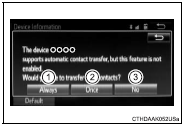
1 Select the desired item.
1Select to transfer new contacts from a cellular phone, select “Always” and then enable “Automatic Contact/ History Transfer”. 2 Select to transfer all the contacts from a connected cellular phone only once.3 Select to cancel transferring.
1 Select the desired item.
1 Select to transfer the contacts from the connected cellular phone. 2 Select to add a new contact manually.3 Select to cancel transferring.
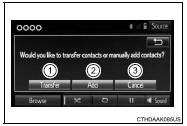
► When “Transfer” is selected Follow the steps in “Update contacts from phone” from “STEP2”.
► When “Add” is selected Follow the steps in “Registering a new contact to the contacts list” from “STEP2”.
Test yourself
A quick Toyota Corolla quiz: every answer comes with an explanation and a link to the manual page.