Audio system
Message settings
In this manual: Audio system
15steps
~90min
4/5difficulty
Done 0 of 15
- Display the "phone/message settings" screen.
- Select "messaging settings".
- Select the desired item to be set.
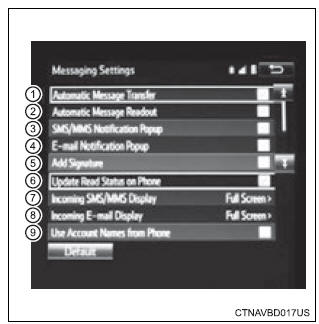
- Set automatic message transfer on/off.
- Set automatic message readout on/off.
- Set the sms/mms notification popup on/off.
- Set the e-mail notification popup on/off.
- Set adding the vehicle signature to outgoing messages on/off.
- Set updating message read status on phone on/off.
- Change the incoming sms/mms display.
“Full screen”: when an sms/mms message is received, the incoming sms/mms display screen is displayed and can be operated on the screen.
“Drop-down”: when an sms/mms message is received, a message is displayed on the upper side of the screen.
- Change the incoming e-mail display.
“Full screen”: when an e-mail is received, the incoming e-mail display screen is the displayed and can be operated on the screen.
“Drop-down”: when an e-mail is received, a message is displayed on the upper side of the screen.
- Set display of messaging account names on the inbox tab on/off.
When set to on, messaging account names used on the cellular phone will be displayed.
Select “default”, and then “yes”.
Displaying the “messaging settings” screen in a different way- Display the phone screen.
- Select
 .
- Select "settings".
Was this page helpful?