Driving information display
■ Drive information
2 items that are selected using the "Drive Info Items" setting (average speed and distance) can be displayed vertically.
Use the displayed information as a reference only.
- "Average Speed": Displays the average vehicle speed since engine start*
- "Distance": Displays the distance driven since engine start*
- "Total Time": Displays elapsed time since engine start*
■ Trip information
2 items that are selected using the "TRIP A Items" or "TRIP B Items" setting (average speed and distance) can be displayed vertically.
Use the displayed information as a reference only.
- "Average Speed": Displays the average vehicle speed since the display was reset*
- "Distance": Displays the distance driven since the display was reset*
- "Total Time": Displays elapsed time since the display was reset*
*: To reset, display the desired item and press and hold  .
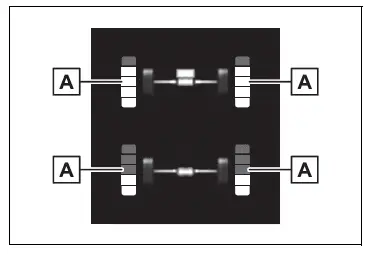
- Torque distribution display
Displays the drive status of each wheel in 6 steps from 0 to 5.
The illustration used is intended as an example, and may differ from the image that is actually displayed on the multi-information display.
Blank (No items)
Displays no drive information contents on the multi-information display.
Test yourself
A quick Toyota RAV4 quiz: every answer comes with an explanation and a link to the manual page.