Meter control switches
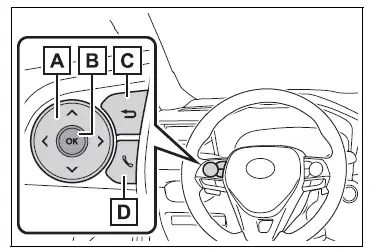
 : Change the screen
and move the cursor : Change displayed
content and scroll up/down the screen- Press: Enter/Set
Press and hold: Reset/Display customizable items/Display the cursor - Move the main meter and return to the previous screen
- Call sending/receiving and history display
Linked with the hands-free system, sending or receiving call is displayed.
For details regarding the hands-free system, refer to the "MULTIMEDIA OWNER'S MANUAL".
Changing the display
The multi-information display is operated using the meter control switches.
■ Changing the meter display type setting
The meter display type setting can be changed on  .
■ Changing the screen
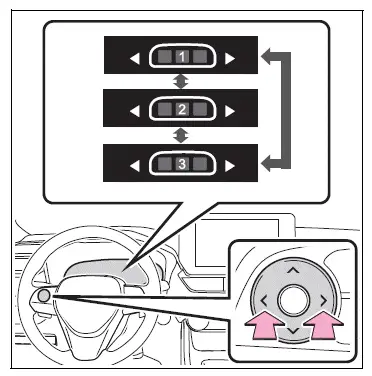
Select items from the combination of 3 screens to display on each 3 content display areas.
Press  or
 of the meter
control switches to scroll the screen.
■ Changing the display contents
Switches items displayed on each contents display area (left/center/right).
1. Press and hold  to display
the cursor on the content display area (center).
2. Press  or
 to move the
cursor and select the content display area.
3. Press  or
 to select the
items.
■ Items displayed in the content display area
Select to enable/disable items on the content display area (left/right).
1. Press and hold  to display
the cursor on the content display area (center).
2. Press  or
 to move the
cursor and select the content display area.
3. Contents display area (left):
Press  to display contents
list.
Contents display area (right):
Press  to display contents
list.
4. Press  or
 v to select the
items.
5. Press  to select
enable/disable items.
WARNING
■Caution for use while driving
For safety, avoid operating the meter control switches while driving as much as possible, and do not look continuously at the multi-information display while driving.
Stop the vehicle and operate the meter control switches. Failure to do so may cause a steering wheel operation error, resulting in an unexpected accident.
Test yourself
A quick Toyota RAV4 quiz: every answer comes with an explanation and a link to the manual page.