Audio system
Clock setting
In this manual: Audio system
6steps
~36min
2/5difficulty
Done 0 of 6
- Display the “General Settings” screen. Operations up to this point can also be performed by select the clock display at the top of most screens.
- Select the items to be set.
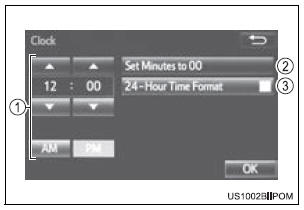
- Manual clock setting
- Set minutes to 00
- The 24-hour time format can be to on/off.
- Select “OK”.
Test yourself
A quick Toyota Sienna quiz: every answer comes with an explanation and a link to the manual page.
Was this page helpful?