Audio system

Screen for general settings

2steps
~12min
1/5difficulty
Done 0 of 2
  1. Press the “SETUP” button.
  2. Select “General” on the “Setup” screen.
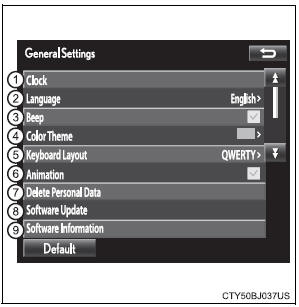
    Toyota Sienna. Screen for general settings

  1. Select to adjust the clock.
  • “English”, “Français” or “Español” can be selected.
  • On/off can be selected to sound beeps.
  • Select to change the screen color.
  • Select to change the keyboard layout.
  • The animation effect for the screen can be set to on/off.
  • Select to delete personal data
  • Select to update program versions. For details, contact your Toyota dealer.
  • Select to display the software information. Notices related to third party software used in this product are enlisted. (This includes instructions for obtaining such software, where applicable.)
  • To return to the default volume settings

    Select “Default”, and then “Yes”.

    Test yourself

    A quick Toyota Sienna quiz: every answer comes with an explanation and a link to the manual page.