Door lock
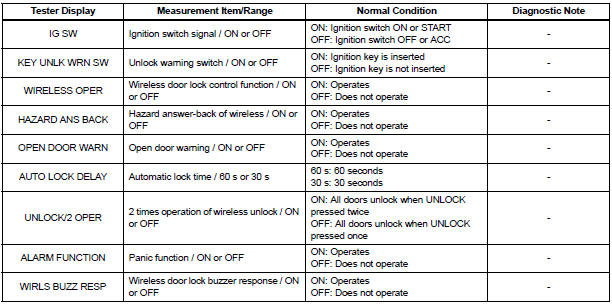
Data list / active test
In this manual: Door lock
3steps
~18min
2/5difficulty
Done 0 of 3
1. DATA LIST
- The wireless door lock control data list can be displayed while the intelligent tester is connected to the DLC3 with the ignition switch in the ON position.
Follow the prompts on the tester screen to access the DATA LIST.
BODY:
2. ACTIVE TEST
HINT: Performing the ACTIVE TEST using the intelligent tester allows components such as the relay, VSV and actuator to operate without removing parts. Performing the ACTIVE TEST as the first step in troubleshooting is one way to shorten labor time.
It is possible to display the DATA LIST during the ACTIVE TEST.
- Connect the intelligent tester to the DLC3.
- Turn the ignition switch to the ON position.
- According to the display on the tester, preform the ACTIVE TEST.
HINT: The ignition switch must be turned to the ON position to proceed with the ACTIVE TEST using the intelligent tester.
BODY:

Test yourself
A quick Toyota Sienna quiz: every answer comes with an explanation and a link to the manual page.
Was this page helpful?