Audio system
Phone Display Settings
In this manual: Audio system
5steps
~30min
2/5difficulty
Done 0 of 5
- Display the “Phone/Message Settings” screen.
- Select “Phone Display Settings”.
- Select the desired item to be set.
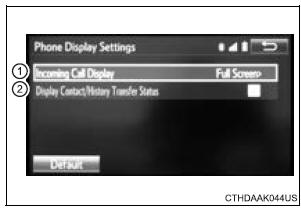
- Change the incoming call display.
“Full Screen”: When a call is received, the hands-free screen is displayed and can be operated on the screen.
“Drop-Down”: A message is displayed on the upper side of the screen.
- Set display of the contact/ history transfer completion message on/off.
To return to the default settings
Select “Default”, and then “Yes”.
Test yourself
A quick Toyota Sienna quiz: every answer comes with an explanation and a link to the manual page.
Was this page helpful?