Audio system
“Contact/Call History Settings” screen
In this manual: Audio system
5steps
~30min
2/5difficulty
Done 0 of 5
- Display the “Phone/Message Settings” screen.
- Select “Contact/Call History Settings”.
- Select the desired item to be set.
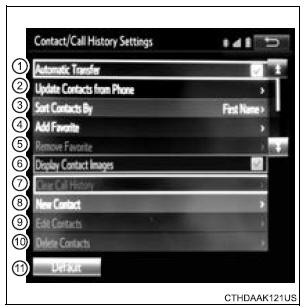
- For PBAP compatible Bluetooth® phones, select to set “Automatic Transfer” on/ off. When set to on, the phone’s contact data and history are automatically transferred.
- Select to update contacts from the connected phone.
*: For PBAP compatible Bluetooth® phones only, this function is available when “Automatic Transfer” is set to off.
Test yourself
A quick Toyota Sienna quiz: every answer comes with an explanation and a link to the manual page.
Was this page helpful?