Television Camera

ILLUSTRATION
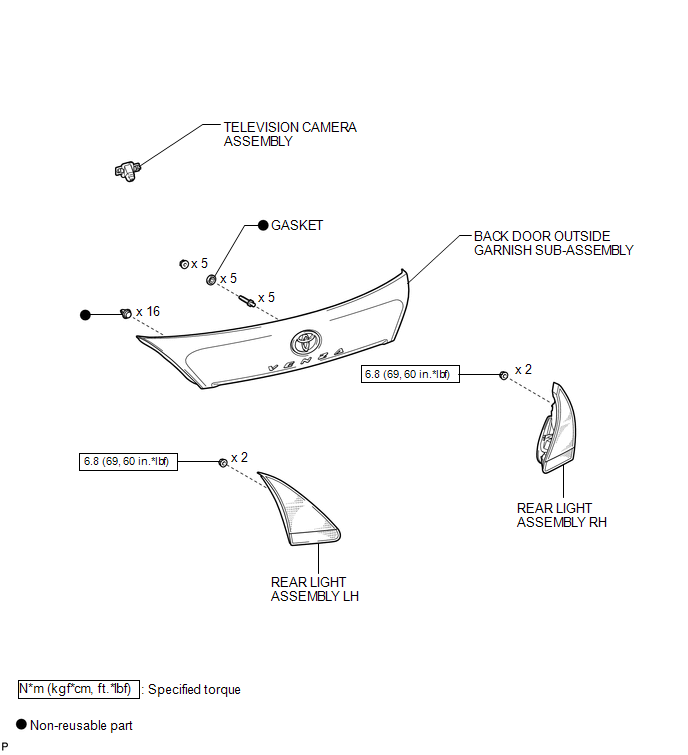
Removal REMOVAL PROCEDURE
1. REMOVE BACK DOOR PANEL TRIM ASSEMBLY

2. REMOVE REAR WIPER ARM HEAD CAP
3. REMOVE REAR WIPER ARM AND BLADE ASSEMBLY
4. REMOVE REAR WIPER MOTOR GROMMET
5. REMOVE REAR WIPER MOTOR AND BRACKET ASSEMBLY
6. REMOVE REAR LIGHT ASSEMBLY LH
7. REMOVE REAR LIGHT ASSEMBLY RH
HINT:
Use the same procedure for the RH side and the LH side (See page ).
8. REMOVE BACK DOOR OUTSIDE GARNISH SUB-ASSEMBLY
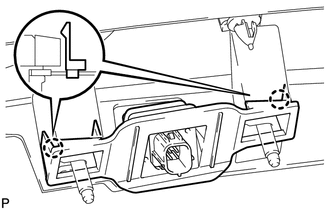
9. REMOVE TELEVISION CAMERA ASSEMBLY
(a) Disengage the 2 claws and remove the television camera assembly. |
 |
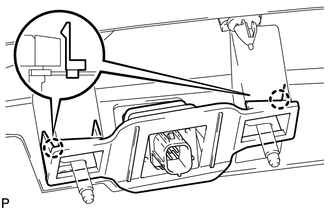
1. INSTALL TELEVISION CAMERA ASSEMBLY
(a) Engage the 2 claws to install the television camera assembly. |
 |
2. INSTALL BACK DOOR OUTSIDE GARNISH SUB-ASSEMBLY

3. INSTALL REAR LIGHT ASSEMBLY RH
HINT:
Use the same procedure for the RH side and the LH side (See page ).
4. INSTALL REAR LIGHT ASSEMBLY LH
5. INSTALL REAR WIPER MOTOR AND BRACKET ASSEMBLY
6. INSTALL REAR WIPER MOTOR GROMMET
7. INSTALL REAR WIPER ARM AND BLADE ASSEMBLY
8. INSTALL REAR WIPER ARM HEAD CAP
9. INSTALL BACK DOOR PANEL TRIM ASSEMBLY
Test yourself
A quick Toyota Venza quiz: every answer comes with an explanation and a link to the manual page.