Electrical Equipment from 06/2011
Back-Up Lamp in the Bumper Cover
In this manual: Electrical Equipment from 06/2011
~1min read
Left Back-Up Lamp -X1- or Right Back-Up Lamp -X2-, Removing and Installing
Special tools and workshop equipment required
- Torque Wrench 1783 - 2-10Nm -VAG1783-
The Left Back-Up Lamp -X1- and the Right Back-Up Lamp -X2- are located in the lower section of the rear bumper cover. The rear bumper cover must be removed in order to remove or install the back-up lamp.
Removing
- Switch off the ignition and all electrical consumers and remove the ignition key.
- Remove the rear bumper cover.
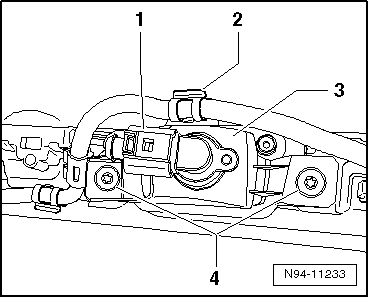
- Disconnect the connector -1-.
- Unclip the wire from the wiring guide -2-.
- Remove both screws -4- and remove the back-up lamp -3- from the bumper cover.
Installing
Install in reverse order of removal. Note the following:
- Tighten the screws -4- to 3 N·m.
- Check the functionality of the backup lamp.
Left Back-Up Lamp Bulb -M16- and Right Back-Up Lamp Bulb -M17-, Replacing
Note
The Left Back-Up Lamp Bulb -M16- and the Right Back-Up Lamp Bulb -M17- cannot be replaced individually. If damaged, replace the complete Left Back-Up Lamp -X1- or Right Back-Up Lamp -X2-.
Test yourself
A quick Volkswagen Tiguan quiz: every answer comes with an explanation and a link to the manual page.
Was this page helpful?