Multifunction Steering Wheel from 05/2010
General Information
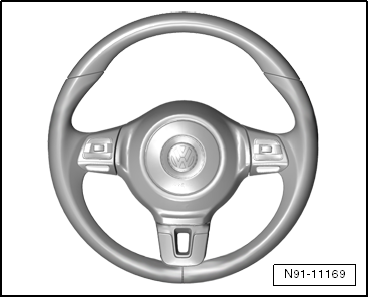
The multifunction steering wheel makes it possible to control some functions of the communications system and the cruise control from the steering wheel.
The multifunction steering wheel has:
- The control unit in the steering wheel with two button arrays with integrated electronics, left and right on the steering wheel.
Note
- Familiarity with the function and operation of the digital sound system is needed if there are customer concerns.
- Refer to the Owner's Manual.
Troubleshooting
The multifunction steering wheel control module communicates only with the steering column electronics control module. Data commands are processed there once more for further communication with subsequent control modules (radio system, multi-function display "MFA" and telephone system).
The multifunction steering wheel is equipped with OBD.
When performing service work or fault-finding, use the Vehicle Diagnostic Tester in the "Guided Fault Finding" function.
Control Module in Steering Wheel, Removing and Installing
Removing
- Remove the driver airbag unit.
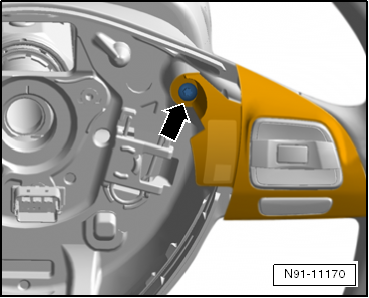
- Remove the bolt -arrow-.
- Remove the block of buttons.
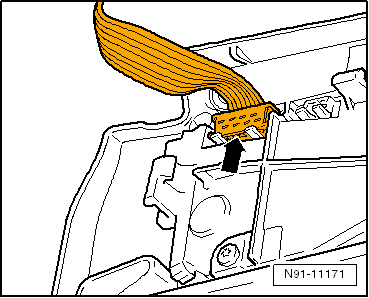
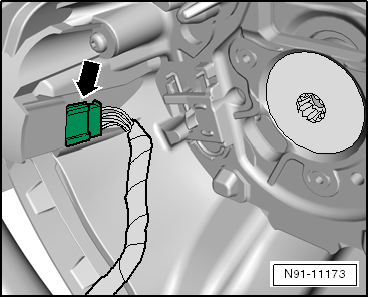
- Disconnect the connector -arrow- from the block of buttons.
Installing
Install in reverse order of removal.
Note
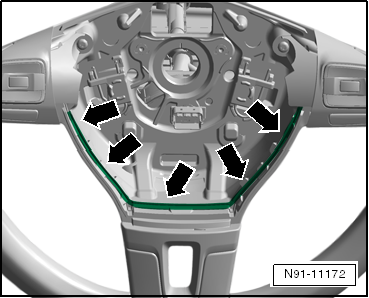
- Make sure to route the wires between both blocks of buttons as illustrated -arrows-.
- Make sure the black connector is connected to the left block of buttons -arrow-.
- Code the control module for steering column electronics, see adapting components, multi-function steering wheel.
Multifunction Steering Wheel, Adapting Components
Special tools and workshop equipment required
- Vehicle Diagnostic Tester
Components, Multi-Function Steering Wheel, Adapting
Select "Guided Functions" or "Guided Fault Finding" on the Vehicle Diagnostic Tester.
After all control modules have been checked:
- Press the "GO TO" button.
- Select "Functions/Component selection".
- Select "Body".
- Select "Electrical Equipment".
- Select "01-OBD-capable system".
- Select "Steering Column Electronics".
- Select "Code Control Unit Function".
Test yourself
A quick Volkswagen Tiguan quiz: every answer comes with an explanation and a link to the manual page.