Climate Control
Adding and Editing a Timer Setting for Preconditioning
In this manual: Climate Control
11steps
~66min
3/5difficulty
Done 0 of 11
(Option/accessory.)
The preconditioning timer can store up to 8 timer settings.
Adding a Timer Setting
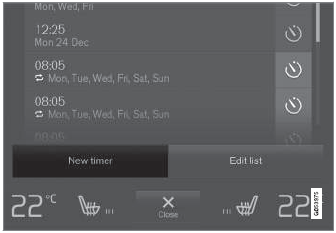
Button for adding a timer setting in the Parking Climate tab in Climate view.
- Open Climate view on the center display.
- Select the Parking Climate tab.
- Tap Add timer.
- A pop-up window appears.
- Tap Date to set a time for a specific date.
Tap Days to set a time for one or more days of the week.
With Days: Activate/deactivate the repeat function by selecting/deselecting the Repeat weekly checkbox.
- With Date: Select a date for preconditioning by scrolling in the date list using the arrows.
With Days: Select days of the week for preconditioning by tapping the buttons for the days.
- Set the time at which preconditioning should be completed by scrolling using the arrows in the clock.
- Tap Confirm to add a timer setting.
- The timer setting will be added to the list and activated.
Editing a Timer Setting
- Open Climate view on the center display.
- Select the Parking Climate tab.
- Tap the timer setting you would like to change.
- A pop-up window appears.
- To edit a timer setting, follow the procedures described under the heading "Adding a timer setting" above.
Test yourself
A quick Volvo XC90 quiz: every answer comes with an explanation and a link to the manual page.
Was this page helpful?