Climate Control
Synchronizing the Temperature
In this manual: Climate Control
2steps
~12min
1/5difficulty
Done 0 of 2
The temperature in the different climate zones of the vehicle can be synchronized with the temperature set for the driver's side.
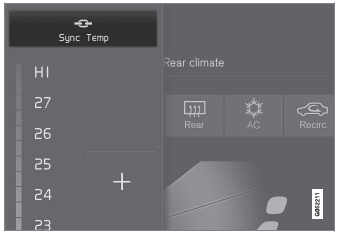
Synchronization button on the driver's side temperature control.
- Tap the driver's side temperature button in the center display's climate bar to open the control.
- Tap Sync Temperature.
- The temperature for all of the vehicle's climate zones will be synchronized with the one set for the driver's side and the synchronization symbol will be displayed next to the temperature button.
Synchronization is stopped by pressing Sync Temperature again or by changing the temperature setting for a climate zone other than the driver's.
Test yourself
A quick Volvo XC90 quiz: every answer comes with an explanation and a link to the manual page.
Was this page helpful?