Climate Control
Deleting a Preconditioning Timer Setting
In this manual: Climate Control
5steps
~30min
2/5difficulty
Done 0 of 5
(Option/accessory.)
A preconditioning timer setting that is no longer needed can be deleted.
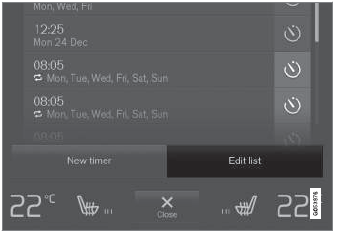
The button for editing a list/deleting a timer setting in the Parking climate tab in Climate view.
- Open Climate view on the center display.
- Select the Parking Climate tab.
- Tap Edit list.
- Tap the editing icon to the right in the list.
- The icon will change to the text Delete.
- Tap Delete to confirm.
- The timer setting will be deleted from the list.
Test yourself
A quick Volvo XC90 quiz: every answer comes with an explanation and a link to the manual page.
Was this page helpful?