Регулирование внутреннего освещения
Освещение в транспортном средстве варьируется в зависимости от режима зажигания. The interior lighting can be adjusted with a thumb wheel in the dashboard and certain light functions can also be adjusted via the center display.
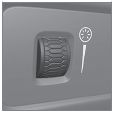 The thumb wheel on the dashboard to the left of the steering wheel can be used to adjust the brightness of the display lighting, instrument lighting, ambient lighting and mood lighting*.
Отрегулируйте освещение окружающей среды
- Tap Настройки in the Top view in the center display.
- Tap My Car
 Lights and Lighting
 Interior Lighting.
- Choose from among the following settings:
- Under Интенсивность окружающего света, select Выключенный, Низкий or Высокий.
- Under Уровень окружающего освещения, select Уменьшенный or Полный.
Регулирование освещения настроения*
The vehicle is equipped with several LEDs that provide faint lighting in various colors. Это освещение включено, когда двигатель работает.
Изменение яркости
- Tap Настройки in the Top view in the center display.
- Tap My Car
 Lights and Lighting
 Interior Lighting
 Interior Mood Lighting.
- Under Интенсивность света внутреннего настроения, select Выключенный, Низкий or Высокий.
Изменение цвета света
- Tap Настройки in the Top view in the center display.
- Tap My Car
 Lights and Lighting
 Interior Lighting
 Interior Mood Lighting.
- Choose По температуре or По цвету to change the color of the light.
If По температуре is selected, the light will change according to the temperature set for the passenger compartment.
If По цвету is selected, the subcategory Цвета темы can be used to make further adjustments.
* Опция/аксессуар.
Проверьте себя
Короткий тест по Volvo XC90: после ответа — пояснение и ссылка на страницу руководства.