Audio, media and internet
Changing the waveband and radio station
In this manual: Audio, media and internet
3steps
~18min
2/5difficulty
Done 0 of 3
Instructions for changing wavebands, waveband lists and radio stations in the selected list are provided here.
Changing the waveband
Swipe from App view on the center display and select the desired waveband (e.g. FM), or open the App menu in the instrument panel with the right-side steering wheel keypad and make your selection there.
Changing the list in the waveband
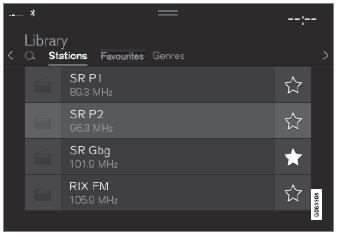
- Tap Library.
- Select playback from Stations, Favorites or Genres.
- Tap the desired station in the list.
Favorites – only plays selected favorite channels.
Genres – only plays channels broadcasting the selected genre or program type, e.g. pop, classical, etc.
Changing radio stations in the selected list
- Press
 or
 under the center display or on the right-side steering wheel keypad.
- Move step by step through the selected list.
It is also possible to change radio station in the selected list via the center display.
Test yourself
A quick Volvo XC90 quiz: every answer comes with an explanation and a link to the manual page.
Was this page helpful?