Access/Start System Antennas, Removing and Installing
Access/Start System Antenna 1 in Vehicle Interior -R138-, Removing and Installing
Removing
- Remove the multimedia system control head. Refer to → Communication; Rep. Gr.91; Infotainment System; Multimedia System Control Head E380, Removing and Installing.
- Remove the bolt -3-.
- Remove the antenna -1-.
- Disconnect the connector -2-.
Installing
Install in reverse order of removal. Note the following:
- Make sure the antenna fits securely in the mount -4- when installing it.

Access/Start System Antenna in Luggage Compartment -R137-, Removing and Installing
Removing
- Lift the luggage compartment floor covering by the handle and fold it forward.
Vehicles with High Voltage System:
- Remove the rear lid end trim panel. Refer to → Body Interior; Rep. Gr.70; Luggage Compartment Trim Panels; Lock Carrier Trim Panel, Removing and Installing.
- Remove the rear outlet air guide. Refer to → Heating, Ventilation, and Air Conditioning; Rep. Gr.87; Battery Cooling Module.
All Vehicles:
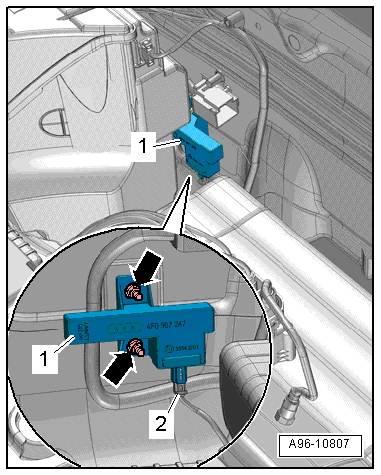
- Remove the nuts -arrows- and remove the antenna -1-.
- Disconnect the connector -2-.
Installing
Install in reverse order of removal.
Left and Right Access/Start Authorization Antenna -R200-/-R201-, Removing and Installing
Removing
- Remove the rear door trim panel. Refer to → Body Interior; Rep. Gr.70; Rear Door Trim Panels; Rear Door Trim Panel, Removing and Installing.
- Remove bolts -arrows- and remove the antenna -1-.
- Disconnect the connector -2-.
Installing
Install in reverse order of removal.
