Head-up display
Applies to: vehicles with Head-up Display

Fig. 12 Example: indicators in the Head-up display
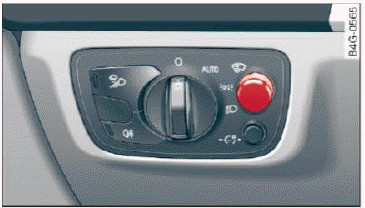
Fig. 13 Instrument panel: knob for the head-up display
The Head-up display projects certain warnings or selected information from the assist systems or navigation on the windshield. The display appears within the driver's field of vision.
Switching on/off
- To switch the head-up display on or off, press the knob

 fig. 13.
Adjusting the height
The height of the display can be adjusted to the individual driver.
- Make sure you are seated correctly.
- Turn the knob to adjust the display.
Settings in the Infotainment system
- Select: the
 function button > (Car) Systems control button > Driver assistance > Head-up display > Head-up display contents or Display brightness.
Display content
In the Infotainment system, you can specify which information should be displayed: For example, this can include navigation information, Adaptive cruise control or night vision assist.
The display of certain information and some of the red indicator lights cannot be hidden in the Infotainment system.
Display brightness
You can adjust the display brightness in the Infotainment system. The display brightness decreases automatically as the amount of light decreases.
The background brightness is adjusted with the instrument illumination.
Note
To prevent scratches on the glass covering the head-up display, do not place any objects in the projection opening.
Tips
- Sunglasses with polarization filters and unfavorable lighting conditions can have a negative effect on the display.
- An optimum display depends on the seat position and the height adjustment of the head-up display.
- A special windshield is needed for the head-up display function.