Overview

Fig. 4 Driver information system in the instrument cluster
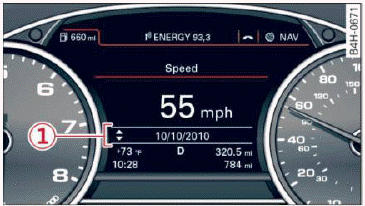
Fig. 5 Instrument cluster: example information line
The information in the driver information system is shown in B tabs A  fig. 4. The following content is possible depending on vehicle equipment:
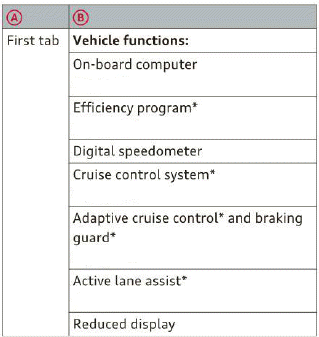

The second and third tabs are only visible if at least one indicator light or message is shown or if that system is switched on.
The status line C is located in the bottom part of the display  fig. 4. It displays the exterior temperature, time, selector lever position, trip odometer and odometer.
For some vehicle functions, you can access the trip information from the temporary memory in line 1 fig. 5.
WARNING
Do not assume the roads are free of ice based on the outside temperature display. Be aware that there may be ice on roads even when the outside temperature is around 41 ºF (+5 ºC) and that ice can increase the risk of accidents.
Tips
- You can select the units used for temperature, speed and other measurements in the Infotainment system.
- If your vehicle is stationary or if you are driving at very low speeds, the temperature displayed may be slightly higher than the actual temperature outside due to the heat radiating from the engine.
- For information on the audio/video and navigation functions, refer to the separate Infotainment system owner's manual.