Cockpit
Operation
In this manual: Cockpit
~1min read
The driver information system is operated using the buttons on the multifunction steering wheel.
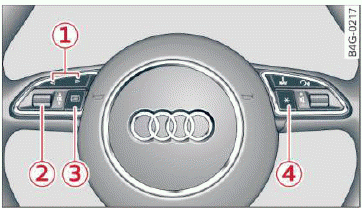
Fig. 6 Multifunction steering wheel: operating the driver information system
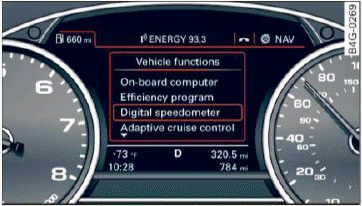
Fig. 7 Instrument cluster: opening the vehicle functions menu
Operating
- Switch the ignition on.
- To switch between the tabs, press the rocker switch 1 to the left or right
 fig. 6.
- To access additional information below or above, turn the thumbwheel 2 down or up.
- To confirm a selection, press the thumbwheel 2.
- To open the submenu for an active tab, press the button
 3.
- To select a function programmed to a steering wheel button, press the button 4.
Opening the Vehicle functions
- Select the first tab with the rocker switch 1.
- Press the button 3. The Vehicle functions menu is displayed fig. 7.
- To select a menu item, turn and press the thumbwheel 2.
Resetting values to zero
- In the Vehicle functions menu, select Onboard computer or Efficiency program.
- You can now select between the long-term memory and short-term memory.
- To reset the values in a memory, press and hold the thumbwheel 2 for one second.
Assigning a function to a programmable steering wheel button
- Select the
 function button > (Car) Systems control button > Vehicle settings > Steering wheel button programming.
The last function selected displays when you switch the ignition on.
Was this page helpful?