On-board computer
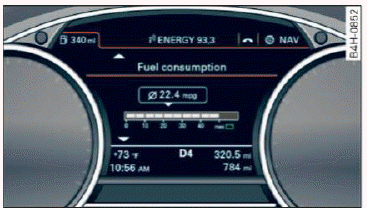
Fig. 8 Instrument cluster: fuel consumption display
You can call up the following information in the on-board computer:
- Date
- Driving time from the short-term memory
- Average consumption from the short-term memory
- Average speed from the short-term memory
- Distance driven from the short-term memory
- Current fuel consumption
- Short-term memory overview
- Long-term memory overview
The short-term memory collects driving information from the time the ignition is switched on until it is switched off. If you continue driving within two hours after switching the ignition off, the new values are included when calculating the current trip information.
Unlike the short-term memory, the long-term memory is not erased automatically. You can select the time period for evaluating trip information yourself.
For some vehicle functions, you can access the driving information from the short-term memory in the line 1  fig. 5.
Fuel consumption
The current fuel consumption can be shown using a bar graph fig. 8. The average consumption stored in the short-term memory is also displayed.
If the bar is green, your vehicle is saving fuel through one of the following functions:
- Recuperation: electrical energy can be stored in the vehicle battery when the vehicle is coasting or driving downhill. The bar will move toward
 .
- Cylinder on demand system: the engine automatically switches four cylinders off when lower power output is required and other conditions are met. This change is not noticeable to the passengers.
Tips
The date, time of day and time and date format can be set in the Infotainment system.