Main menu
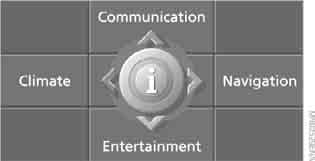
All iDrive functions are grouped in five menus.
Selecting the main menu
Press the button .
To return to the main menu from a menu, :
press the button twice.
Selecting main menu items
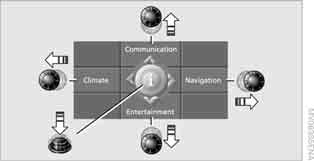
Ignition key in position Radio or higher:
move the controller left, right, forward or back to select one of the four main menu items:
"Communication", "Navigation", "Entertainment" and "Climate" (the so-called main menus).
Pressing the controller opens the menu.
Quick selection of menu items
The quick selection function allows you to:
► when selecting a main menu, open it in the same state it was in when last displayed; switch from one main menu to another without pressing the button .
To do so, move the controller in the corresponding direction and hold it for more than 2 seconds.
Test yourself
A quick BMW X3 quiz: every answer comes with an explanation and a link to the manual page.