Brief overview of operating principles
The operating principles of the systems using iDrive are described below.
The individual steps are shown using the example of Control display settings, Control display brightness.
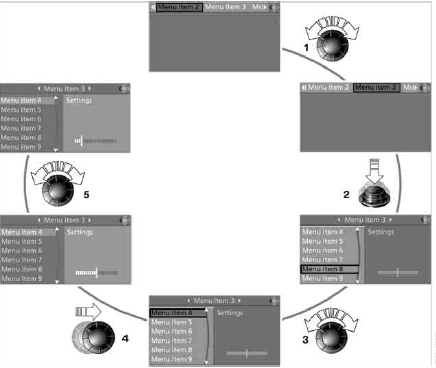
1 Selecting a menu item:
► Turn the controller. The highlight marker on the screen moves with it.
► Menu items printed in white can be selected by moving the highlight marker onto them.
2 Confirming a menu item:
► Press the controller.
► New menu items appear or the corresponding function is executed.
3 Select the menu item: see 1 4 Moving to another field:
► Move the controller left, right, forward or back.
► Release the controller.
► The active field is highlighted with a lighter background.
5 Making settings:
► Turn the controller.
► The setting (shown as a graph, figures or text) changes.
► Confirm the setting by moving to another field.
Test yourself
A quick BMW X3 quiz: every answer comes with an explanation and a link to the manual page.