Selecting the destination on the map
Suppose you only know the location of your destination. In this case, you can locate your destination on the map with the crosshair and enter it into the navigation system for subsequent route guidance.
1. Select "Navigation" and press the controller.
"New destination" is selected by default.
2. Press the controller.
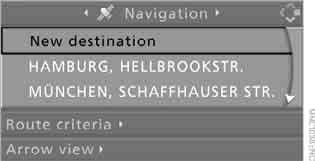
3. Select "Destination input map" and press the controller.

A map section appears on the control display:
► during route guidance – the area of the current destination;
► when route guidance is switched on – the area of the last entered destination.
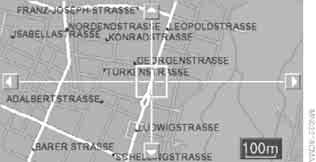
4. Select the destination with the crosshair.
► Changing the scale: turn the controller.
► Moving the map: move the controller in the corresponding direction.
The controller can be moved left, right, forward and back.
5. To accept and save the destination in memory, press the controller.
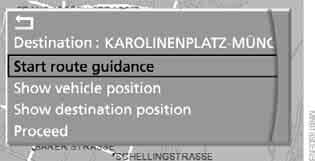
The selected destination and other menu items appear on the screen.
6. Select a menu item:
► "Start route guidance" starts route guidance
► "Show vehicle position" displays the map centred on the current vehicle position
► "Show destination position" displays the map centred on the current destination
► "Proceed" returns to "Destination input map"
► To exit the menu, select
7. Press the controller.
If the map is already displayed, select the destination on it by selecting , and press the controller.
Test yourself
A quick BMW X3 quiz: every answer comes with an explanation and a link to the manual page.