Destination list
The last twenty destinations are stored in the destination list, where they can be selected for later guidance.
To plan a longer route, you can store all intermediate destinations in the destination list, see Entering a destination manually.
Select "Navigation" and press the controller.

The first line of the list shows the destination entered most recently.
Symbol marks the current destination.
To display the next lines of the destination list, turn the controller.
Selecting a destination
1. Select a destination in the list and press the controller.
2. Select "Start guidance" and press the controller.
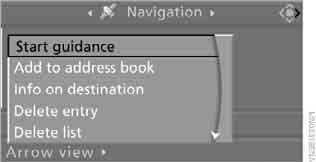
Editing the destination list
1. Select a destination in the list and press the controller.
2. The information for the selected destination can be edited:
► To save the entry, select "Add to address book".
► To display information on the destination, select "Info on destination".
► To delete the entry, select "Delete entry".
► To delete all entries, select "Delete list". Guidance is switched off.
► To change the entry, select "Change destination". For editing, see the section Selecting a destination by town name.
3. Press the controller.
Test yourself
A quick BMW X3 quiz: every answer comes with an explanation and a link to the manual page.