Entering a destination using voice control
A destination can be entered using voice control. To switch from entering a destination via iDrive to entering it by voice, voice control must be activated.
 To hear the possible commands spoken by the system, say {Options}.◄
1. Press the button on the steering wheel .
 2. {Address input}

Selecting the Country
1. Wait for the system to prompt for the destination country.
 2. Say the name of the country.
The name must be spoken in the language set for voice control.
Selecting the destination
The destination can be entered by spelling it out or as a whole word.
Entering by spelling
To enter the destination, say its name letter by letter according to the spelling rules of the destination country.
Speak in an even tone, without raising or lowering your voice, avoiding excessive stress and long pauses.
 1. Say at least the first three letters of the destination name. The more letters spoken, the narrower the search.
The system offers up to 20 destinations matching the search criteria. No more than 6 names can be shown on the display at a time.
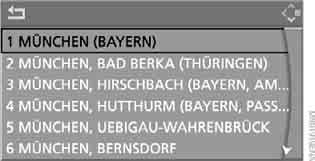

The system offers its suggestions.
2. Select an entry:
► to select the suggested entry: {Yes}
► to select a different entry: {No}
► to select an entry, say, for example, {Entry 3}
► to show the next entries in the list:
{Next page};
► to try again: {Repeat}
An entry from the list can also be selected using iDrive:
Turn the controller to select the destination and press the controller.
Entering a whole word
Place names and streets within the language area set in the voice control system can be entered as whole words.
Example: to enter a destination located in Germany as a whole word, the system must be set to German.
Requirements: Professional navigation system and a suitable navigation DVD.
Speak in an even tone, without raising or lowering your voice, avoiding excessive stress and long pauses.
1. Wait for the system to prompt for the destination.
 2. Say the name of the destination.
The system offers up to 6 destinations matching the search criteria.

 The system offers its suggestions.
3. Select an entry:
► to select the suggested entry: {Yes}
► to select a different entry: {No}
► to select an entry, say, for example, {Entry 3}
► to try again: {Repeat}
► to enter the destination by spelling: {Spell}
An entry from the list can also be selected using iDrive:
turn the controller to select the destination and press the controller.
 Destinations with phonetically similar names are grouped in a separate list marked with an ellipsis.
If necessary, select this list by saying {Yes}, then select the required destination in the list.◄
Entering the street and building number
Select the street in the same way as the destination.
Entering the building number:
 1. {Building number}
2. Say the building number.
Starting route guidance
 {Start route guidance}
Route guidance starts.
Saving the destination in memory
The destination is added to the destination list and can be saved in the address book.
 {Add to destination list}
or
{Add to address book}
Test yourself
A quick BMW X3 quiz: every answer comes with an explanation and a link to the manual page.