Activating the route map
In the "Professional" navigation system:
You can follow your current location on the map. After destination guidance is started, the planned route is shown on the map.
1. Select "Navigation" and press the controller.
2. Push the controller back twice so the selection marker moves to the second field from the top. Turn the controller to select the map display mode and press the controller:
► "Map, north-oriented";
► "Map, indicating dir. of travel";
► "Perspective".

3. Press the controller.
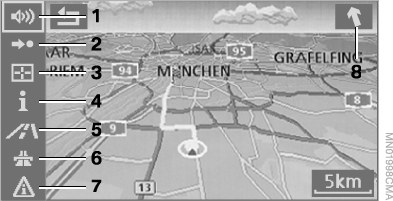
1 Switching voice guidance on and off
2 Switching route guidance on/off
3 Selecting a destination on the map
4 Displaying information
5 Changing the map display mode
►  "Map, north-oriented"
►  "Map, indicating dir. of travel"
►  "Perspective"
6 Changing route criteria
7 Viewing traffic information
8 Direction to destination in a straight line
To exit the menu, select and press the controller.
At a scale of less than 500 km, you can select the map orientation: "North-oriented", "Indicating direction of travel", or "Perspective". At a scale of 500 km or more, the map is always north-oriented.
Changing the map display mode


Select the corresponding symbol and press the controller.
The map changes its view.
Changing the scale
The scale is changed by turning the controller.
Test yourself
A quick BMW X5 quiz: every answer comes with an explanation and a link to the manual page.