Detour Around Route Sections
During route guidance, you can make the navigation system detour around planned route sections. You can specify after how many kilometers you want to return to the original route.
1. Select "Navigation" and press the controller.
2. Push the controller back so the selection marker moves to the second field from the top. Turn the controller to select "New route for" and press the controller.
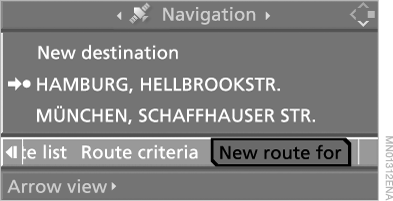
You can detour around a section of a certain length:
► in the "Professional" navigation system – of any length;
► in combination with the "Business" navigation system – up to 50 km.
3. Turn the controller to set the distance in kilometers and confirm it.
4. In the "Business" navigation system:
select "Calculate" and press the controller.
The route is recalculated.
To close the menu without changing the route, select and press the controller.
Test yourself
A quick BMW X5 quiz: every answer comes with an explanation and a link to the manual page.