Checking Engine Oil Level on 523i, 525i, 530i Engines
Your vehicle is equipped with an electronic oil level control.
The oil level reading is reliable only if the measurement is taken with the engine at operating temperature, i.e., after the vehicle has been driven at least 10 km.
You can monitor the oil level while driving or when stopped on a level surface with the engine running.
iDrive operating principles
1. Press the button .
The main menu opens.

2. Press the controller to open the menu .
3. Select "Service" and press the controller.
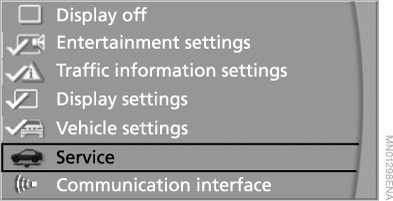
4. Select "Service requirements" and press the controller.
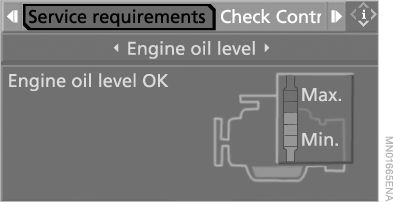
5. Select "Engine oil level" and press the controller.
The display shows the engine oil level.
To exit the menu, select and press the controller.
Possible messages
► "Engine oil level OK" (Engine oil level is correct).
► "No measured value available: Update of engine oil level in process" (No data:
engine oil level is being measured):
engine oil level measurement in progress.
When stopped on a level surface with the engine running, this process may take up to 3 minutes; while driving, up to 5 minutes.
► "Oil level at minimum: Add 1 liter engine oil" (Oil level is at minimum: add 1 liter of engine oil): add 1 liter of engine oil at the first opportunity.
► "Engine oil level too high" (Engine oil level too high):
Have the vehicle checked as soon as possible. Excess oil can damage the engine.◄
► "Please note: recalculated Service interval for engine oil" (Please note: the service interval for engine oil has been recalculated):
do not add oil. You may continue driving, but make sure not to exceed the newly calculated mileage until the next "Oilservice".
Test yourself
A quick BMW X5 quiz: every answer comes with an explanation and a link to the manual page.