Cruise Control
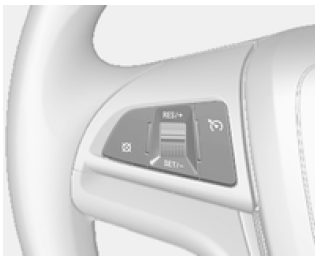
The cruise control system maintains a constant driving speed without the need to press the accelerator pedal.
The system activates when vehicle speed exceeds 20 km/h.
Warning Using cruise control can be dangerous if the driver cannot drive safely at a constant speed.Do not use cruise control on winding roads or in heavy traffic.
Setting the Cruise Control
- Press the button
 , to
switch on cruise control.The indicator light will come on
 .
- Accelerate to the desired speed.
- Turn the control toward SET/- and release it.
- Take your foot off the accelerator pedal.
Increasing the Set Speed
- Turn the control toward RES/+ and hold it.
The vehicle will accelerate. Release the control when the desired speed is reached.
- Turn the control toward RES/+ and release it immediately. The speed will increase by 1~2 km/h.
Decreasing the Set Speed
- Turn the control toward SET/- and hold it.
The vehicle will slow down. Release the control when the desired speed is reached.
- Turn the control toward SET/- and release it immediately. The speed will decrease by 1~2 km/h.
Temporary Acceleration
If you need to temporarily increase speed while cruise control is on, press the accelerator pedal.
The increased speed will not interfere with the cruise control system and will not change the set speed.
To return to the set speed, take your foot off the accelerator pedal.
Temporary Deactivation
- the button is pressed

- vehicle speed drops below 20 km/h
- the brake pedal is pressed
- the brake pedal is pressed for longer than a few seconds
- the gear selector is moved to N
Resuming the Stored Speed
If the cruise control system is still switched on, the last set speed will be restored automatically when the RES/+ switch is pressed.
Disarming
Press the switch- the indicator light goes out. The
cruise control system will be switched off.
Speed Limiter
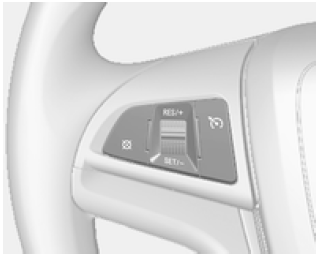
The speed limiter allows you to set a maximum vehicle speed. If the stored maximum speed is exceeded, the system will alert the driver with an indicator light or an audible warning.
Setting the Speed Limit
- Press the button
 , to
switch on the speed limiter.The LIM indicator light will come on.
- Accelerate to the desired speed.
- Turn the control toward SET/- and release it. The current speed can be set if vehicle speed is greater than 30 km/h.
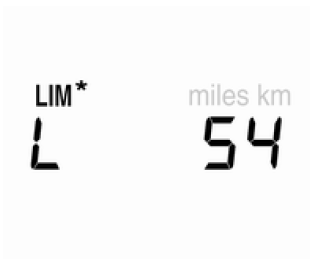
- The set speed is shown in the instrument cluster.
Increasing the Set Speed
- Turn the control toward RES/+ and hold it. The set speed will increase.
Release the control when the desired speed is reached.
- Turn the switch toward the RES/+ mark and release it immediately. The set speed will increase by 1~2 km/h.
Decreasing the Set Speed
- Turn the control toward SET/- and hold it.
The set speed will decrease. Release the switch when the desired speed is reached.
- Turn the switch toward the SET/- mark and release it immediately. The set speed will decrease by 1~2 km/h.
Resuming the Stored Speed
Turn the switch toward the RES/+ mark. The previously set speed will be restored.
To activate the system, turn the switch toward the SET/- mark and release it.
Disarming
To deactivate the speed limiter, press the x button. To turn off the speed limiter system, press the .
Overspeed Warning
If the set speed is exceeded, the warning lamp will flash and an audible warning will sound.
If the current speed is higher than the set speed
If the current speed is higher than the set speed by at least km/h, the LIM* indicator lamp will flash and an audible warning will sound.
If the current speed matches the set speed, the flashing indicator lamp and the audible warning will stop immediately.
However, if the vehicle speed drops 5 km/h below the set speed, an audible warning will also sound.
Restoring the Stored Warning Speed
When the driver presses the RES/+ button while driving at the previously set speed, an audible signal will sound after 25 seconds.
Test yourself
A quick Chevrolet Aveo quiz: every answer comes with an explanation and a link to the manual page.