Multimedia Manual
Tone Settings
In this manual: Multimedia Manual
~1min read
In the tone settings menu, individual tone characteristics can be set for each radio band and each audio source.
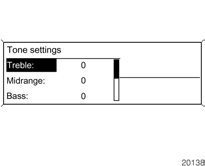
To open the tone menu, press the TONE button.
Adjusting Bass, Midrange and Treble

Select Bass, Midrange or Treble.
Set the desired value for the selected option.
Adjusting Front-to-Rear Volume Balance
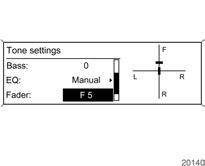
Select Fader.
Set the desired value.
Adjusting Right-to-Left Volume Balance
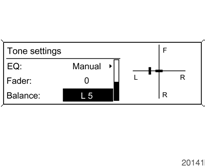
Select Balance.
Set the desired value.
To reset the settings to "0", select the desired option and press and hold the MENU knob for several seconds.
Optimizing Tone for Music Style
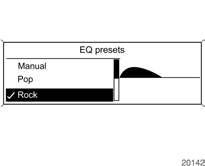
Select EQ presets (equalizer).
The displayed options allow the bass, midrange and treble presets to be optimized for the corresponding music style.
Select the desired option.
Test yourself
A quick Chevrolet Cruze quiz: every answer comes with an explanation and a link to the manual page.
Was this page helpful?