Multimedia Manual
Setting the Time and Date
In this manual: Multimedia Manual
~1min read
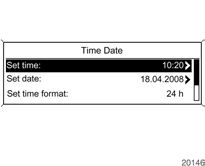
If it is necessary to change the time or date display:
Select Time Date.
Radio with CD player: Select System Settings.
Possible setting options:
Set time:
the display shows the time change.
Set date: the display shows the date change.
Set time format: changes the format of the displayed time.
Set date format: changes the format of the displayed date.
RDS clock synchronization:
when this function is enabled, the time display will be updated automatically using the time signals from the RDS station
Set the required settings.
Test yourself
A quick Chevrolet Cruze quiz: every answer comes with an explanation and a link to the manual page.
Was this page helpful?