Automatic lighting systems - General recommendations
The automatic lighting systems use a detection camera, located at the top of the windscreen.
Operating limits
The system may be disturbed or may not operate correctly:
- When visibility conditions are poor (e.g. snowfall, heavy rain).
- If the windscreen is dirty, misted or obstructed (e.g. sticker) in front of the camera.
- If the vehicle is facing certain signs or retro-reflective devices on crash barriers.
The system is not able to detect: - Road users who have no lighting of their own, such as pedestrians.
- Vehicles whose lights are masked (e.g. vehicles driving behind a crash barrier on a motorway).
- Vehicles at the top or bottom of a steep slope, on winding bends, or at crossroads.
Maintenance
Clean the windscreen regularly, particularly the area in front of the camera.
The inside of the windscreen may also mist up at the camera.
In humid and cold weather, defog the windscreen regularly.
Do not let snow build up on the bonnet or the roof of the vehicle, as it could obstruct the camera.
Automatic high beam switching
For further information, refer to the General recommendations for automatic lighting systems.
With the lighting control ring in the "AUTO" position and the function activated in the touch screen, this system automatically switches between main beam and dipped beam headlights according to lighting and traffic conditions, using a camera located at the top of the windscreen.
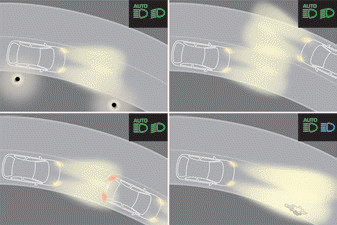
This system is a driving aid.
The driver remains responsible for the vehicle's lighting, for adapting it to light and visibility conditions and to traffic, and for complying with the Highway Code.
The system becomes operational when the vehicle exceeds 25 km/h.
When the speed drops below 15 km/h again, the system is no longer operational.
Activation / Deactivation
 Settings are made via the Driving / Vehicle menu on the touchscreen.
When the system is deactivated, the lighting system switches to "automatic headlight switch-on" mode.
The status of the system is retained when the ignition is switched off.
Operation
If the light level is very low and traffic conditions allow:
 - The main beam headlights switch on automatically. These indicators light up in the instrument cluster.
If the light level is sufficient and/or traffic conditions do not allow the main beam headlights to be switched on:
 - The dipped beam headlights remain on. These indicators light up in the instrument cluster.
The function deactivates when the fog lights are switched on or when the system detects poor visibility conditions (e.g. fog, heavy rain, snowfall).
As soon as the fog lights are switched off or visibility conditions improve, the function reactivates automatically.
 This indicator remains off while the function is deactivated.
Pause
If the situation requires a change in the state of the lights, the driver can intervene at any time.
► Switch manually between dipped beam and main beam to pause the function.
If the "AUTO" and "Dipped beam" indicators were lit, the system switches to main beam.
If the "AUTO" and "Main beam" indicators were lit, the system switches to dipped beam.
► To reactivate the function, switch manually between dipped beam and main beam again.
Static cornering light
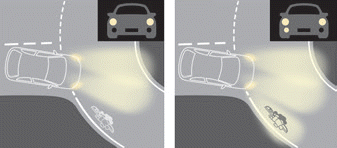
(Only on versions equipped with halogen front fog lights) This function allows the beam of the front fog light to illuminate the inside of a bend when the dipped or main beam headlights are on and when the vehicle speed is below 40 km/h (urban driving, winding roads, intersections, parking manoeuvres).
Activation / Deactivation
Settings are made via the Driving / Vehicle menu on the touchscreen.
Activation / Deactivation
This function is triggered:
- When the corresponding turn indicator is activated.
or
- From a certain steering wheel angle.
It becomes inactive:
- Below a certain steering wheel angle.
- Above a speed of approximately 40 km/h.
- When reverse gear is engaged.
Test yourself
A quick Citroen C5 Aircross quiz: every answer comes with an explanation and a link to the manual page.