Grip management
GENERAL
PREAMBLE
Grip management consists of:
- preventing wheel lock,
- preventing wheel spin,
- optimising trajectories.
of the vehicle during the different driving phases. The different driving phases are: acceleration, braking, change of direction
Grip management makes it possible to:
- maintain vehicle manoeuvrability, i.e. lateral guidance of the front wheels,
- maintain directional stability, i.e. lateral guidance of the rear wheels,
- reduce braking distances compared with a conventional braking system,
- keep control of the vehicle during critical avoidance manoeuvres (within the limits of the laws of physics).
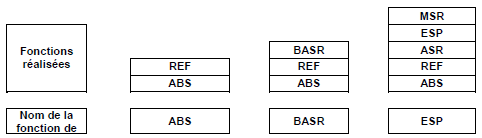
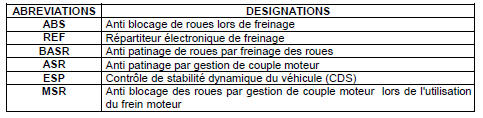
| GRIP MANAGEMENT | FUNCTION NAME | DESCRIPTION |
|
Anti-lock braking system (ABS) |
|
|
Traction control (BASR) |
|
|
Electronic stability control (ESP) |
|
DIAGRAM
The table below lists the functions performed by the basic functions.
ANTI-LOCK BRAKING SYSTEM (ABS)
The anti-lock braking function prevents the front and rear wheels from locking during braking. Directional stability and vehicle manoeuvrability are thus maintained. Braking distance is optimised. The system manages the brake pressure applied to the brake calipers or wheel cylinders, and manages each wheel independently to prevent it from locking.
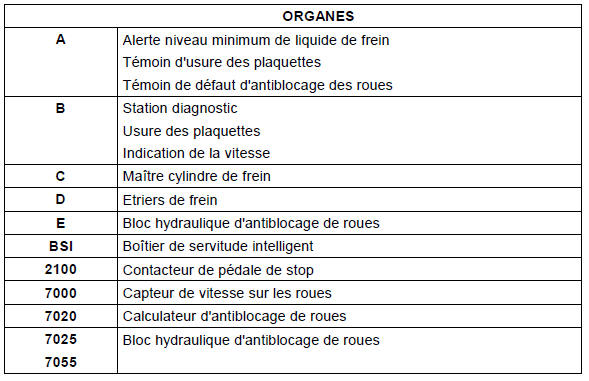
Block diagram
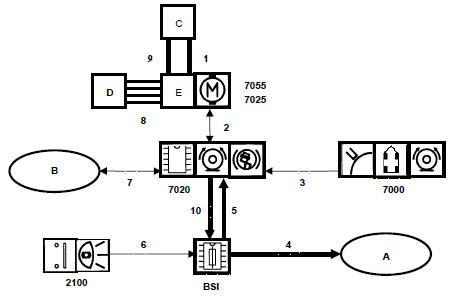
Anti-lock braking system (ABS)
LINKS |
||
| LINK NO. | SIGNAL |
SIGNAL TYPE |
| 1 | Driver brake request (front circuit) | Hydraulic |
| 2 | ABS hydraulic pump motor control Solenoid valve control |
Wired |
| 3 | Solenoid valve control | Frequency modulated |
| 4 | Brake fluid minimum level information. Front brake pad wear information. Anti-lock braking system and EBD (electronic brakeforce distribution) function fault information. |
Body VAN network |
| 5 | Brake pedal switch status | CAN network |
| 6 | Brake pedal position | Wired |
| 7 | ECU diagnosis. Front brake pad wear. Vehicle speed signal 5 pulses per metre |
Wired |
| 8 | Boosted brake pressure to the brake calipers | Hydraulic |
| 9 | Driver braking request (rear circuit) | Hydraulic |
| 10 | ABS warning lamp activation request. EBD warning lamp activation request |
|
WHEEL SLIP CONTROL (BASR)
The wheel slip control function prevents the driven wheels from spinning during acceleration. This maintains directional stability and vehicle manoeuvrability. The system brakes each driven wheel independently to prevent it from spinning.
Block diagram
The BASR function block diagram is identical to the ABS function block diagram; only the ECU software is different.
ELECTRONIC STABILITY PROGRAM (ESP)
Block diagram
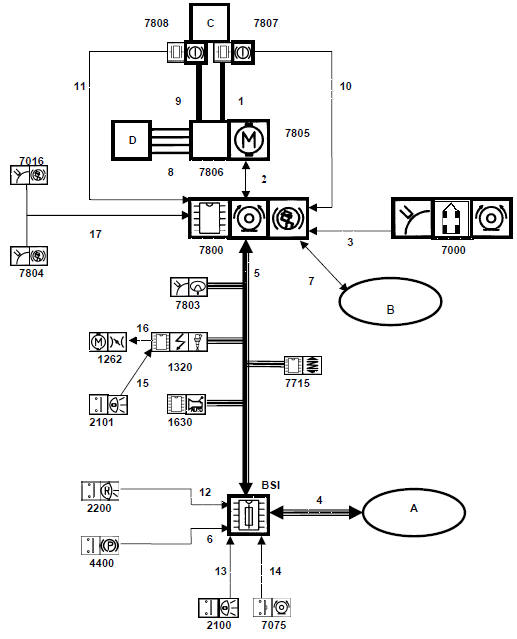
Electronic Stability Program (ESP)
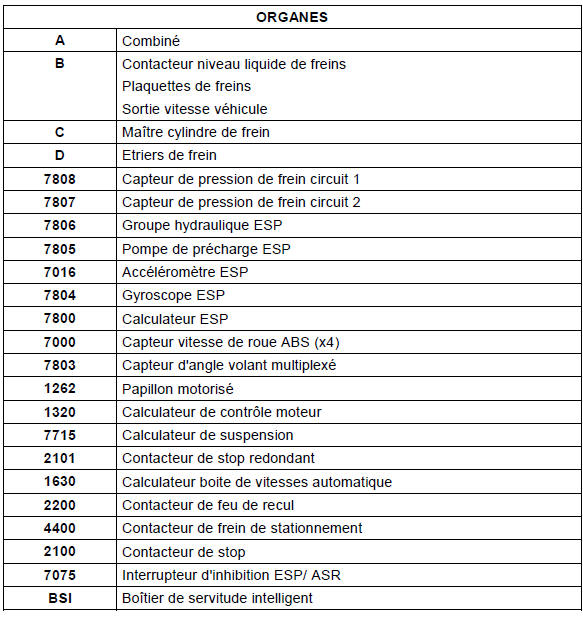
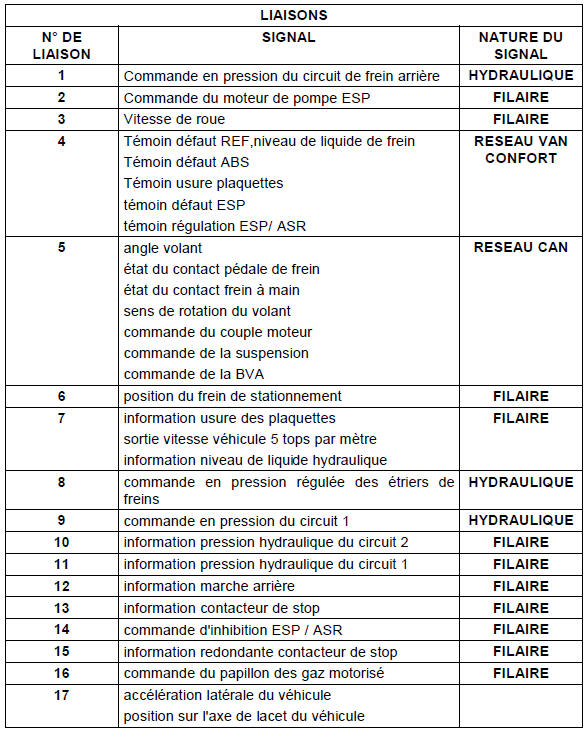
Note: When wheel slip control is included in an ESP system, it manages engine torque in addition to braking the spinning wheel.
The electronic stability program function optimises the vehicle's path. The function consists of two operations:
- calculating the path intended by the driver,
- making the vehicle follow this path (within the limits of the laws of physics).
Need for electronic stability control
When cornering, it may be useful to assist the driver by acting on vehicle components to improve the vehicle's path.
- To restore traction on the front axle, the ESP regulates engine torque.
- To make the vehicle follow the intended path, the ESP brakes one of the vehicle's wheels so as to create a turning torque around that wheel.
Closed-loop control
A steering wheel angle sensor informs the ECU of the intended path.
An accelerometer and a gyroscope inform the ECU of the path actually being followed.
The ECU calculates the difference between the two paths. Based on this difference and the active laws stored in its memory, the ECU determines the action to take so that the actual path comes as close as possible to the intended path.
Activation Deactivation
The ASR and ESP functions can be deactivated by the driver by pressing a push-button switch if:
- the system is not in control mode,
- the speed is below 30 km/h.
The ASR and ESP functions are automatically reactivated when the speed exceeds 30 km/h
Calculation of kinematic information
The table below shows the data entering and leaving the ECU, and their recipients.
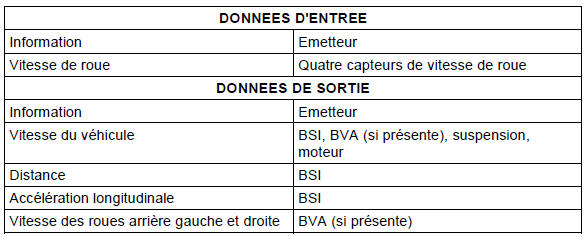
Vehicle speed calculation
Vehicle speed is determined from the arithmetic mean of the front driven wheels. The accuracy of this calculation is ± 2.5%.
Distance calculation
Distance is calculated from the information obtained from the sensors on the two rear wheels.
Longitudinal acceleration calculation
Longitudinal acceleration is calculated from the sensors fitted to the non-driven wheels.
AFTER-SALES OPERATIONS
Degraded modes
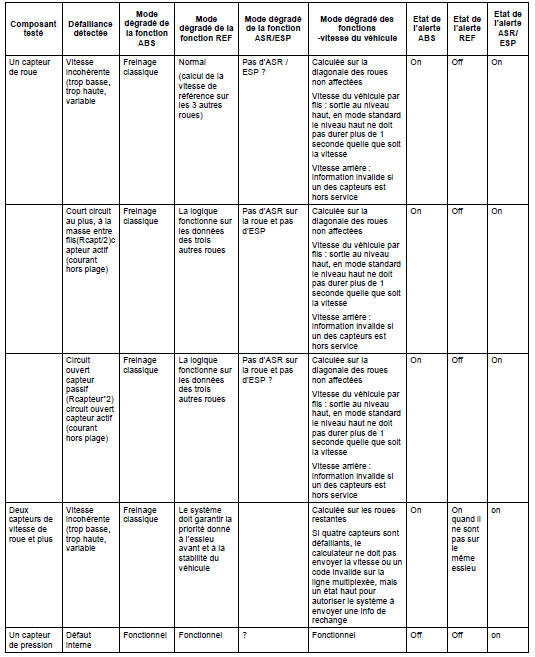
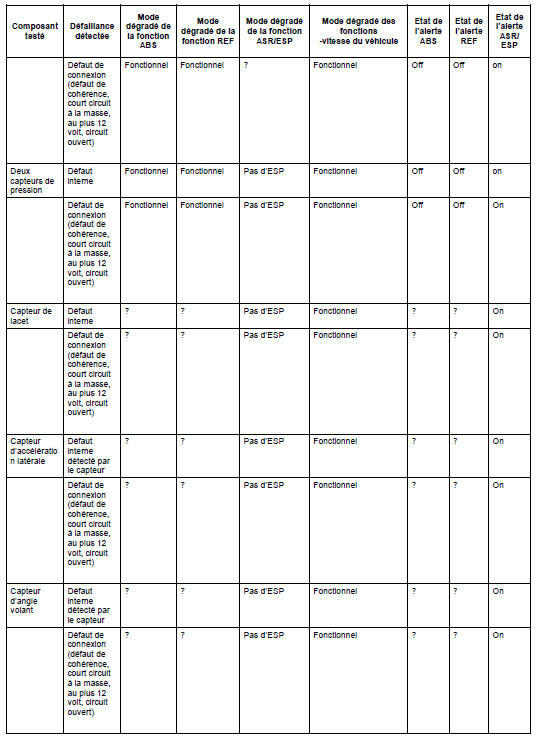
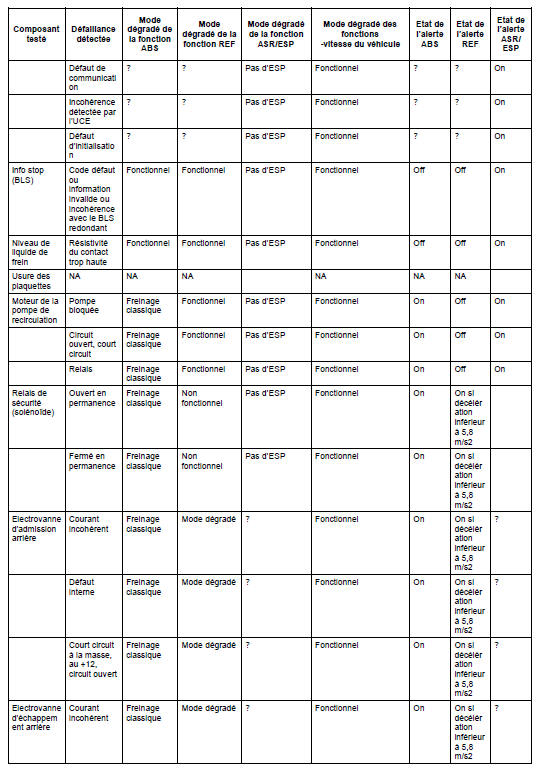
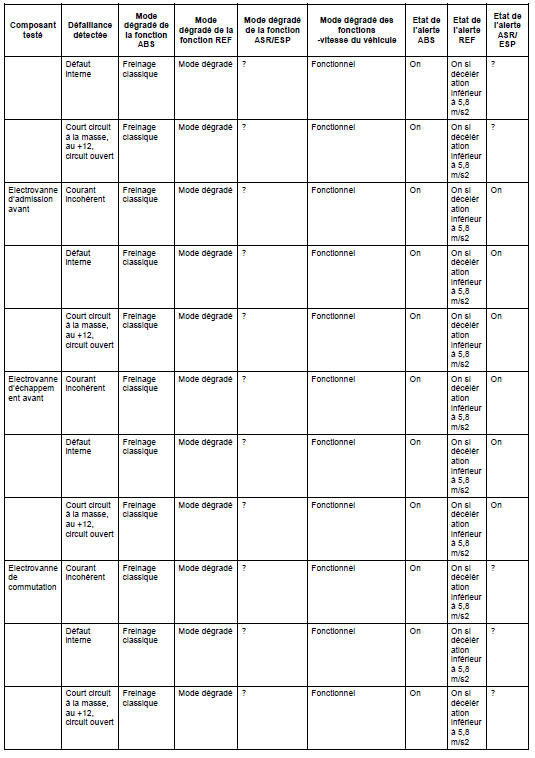
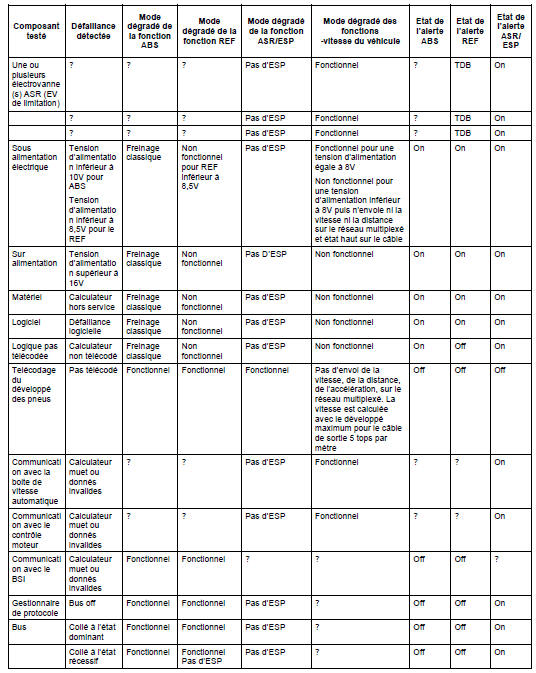
Identification of the substitute wheel
As soon as a wheel is consistently identified as having a rolling circumference differing by more than 5% from the other wheels, it is identified as the substitute wheel. The ECU must then correct the information it delivers. ABS and EBD control must remain fully operational up to a rolling circumference difference of 12% between the substitute wheel and the other wheels. For greater differences, the system switches to degraded mode.
EBD emergency mode
The system must ensure priority is given to the front wheels and to vehicle stability, optimise the rear wheel brake pressure whenever possible, and enforce "select low" operation.
Test yourself
A quick Citroen C5 Aircross quiz: every answer comes with an explanation and a link to the manual page.