Driving
Steering wheel with fixed center controls
In this manual: Driving
~3min read

Steering wheel with fixed center controls
| 1 | Rotation |
|
| Short press |
|
|
| Short press | Resets the trip computer (if the trip computer page is displayed). | |
| 2 | Short press |
|
| Long press | Returns to the initial display of the instrument cluster screen. | |
| 3 | Short press | Increases speed in steps of 1 km/h / stores speed. |
| Press and hold | Increases speed in steps of 5 km/h. | |
| 4 | Short press | Decreases speed in steps of 1 km/h / stores speed. |
| Press and hold | Decreases speed in steps of 5 km/h. | |
| 5 | Short press | Suspends or resumes cruise control/speed limiter (depending on the selected mode). |
| 6 | Short press | Selects cruise control or speed limiter mode (the cycle on this button always starts with speed limiter selection). |
| 7 | Short press | Deactivates cruise control/speed limiter. |
| 8 | Short press |
|
| Long press | Rejects an incoming call. | |
| 9 | Short press / Long press | Horn. |
| 10 | Short press | Activates/deactivates Black Panel mode (night driving). |
| 11 | Short press | Activates voice control. |
| Long press | Repeats the navigation instruction. |
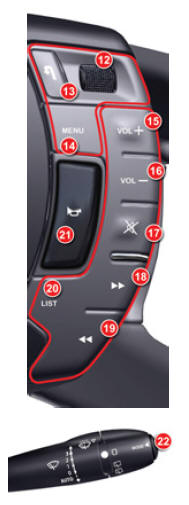
| 12 | Rotation |
|
| Short press |
|
|
| Long press | Opens the main menu of the multifunction display. | |
| 13 | Short press | Cancels the current operation and returns to the previous multifunction display screen. During an incoming phone call: rejects the call. |
| Long press | Returns to the initial multifunction display screen. | |
| 14 | Short press | Accesses the main menu of the multifunction display. |
| 15 | Short press / press and hold | Increases the volume. |
| 16 | Short press / press and hold | Decreases the volume. |
| 17 | Short press |
|
| 18 | Short press |
|
| Press and hold |
|
|
| 19 | Short press |
|
| Press and hold | CD/CD MP3/CD changer/jukebox source: fast rewind. | |
| 20 | Short press |
|
| Long press | Updating the radio station list. | |
| 21 | Short press / long press | Horn. |
| 22 | Short press | Mode: selects the type of information shown on the multifunction display. |
Test yourself
A quick Citroen C5 quiz: every answer comes with an explanation and a link to the manual page.
Was this page helpful?