6-speed automated manual gearbox
Six-speed automated manual gearbox offering, as you choose, the convenience of automatic shifting or the enjoyment of manual gear selection.
Two driving modes are therefore available:
- automatic operation, where the gearbox manages gear changes electronically,
- manual operation, where the driver selects gears sequentially.
In automated mode, you can always change gear temporarily using the steering wheel paddles, for example, to overtake.
A SPORT programme is available in automated mode for a more dynamic driving style.
Mode selection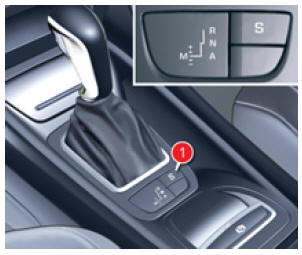
Mode selection
- automatic mode: selector in position A,
- sequential mode: selector in position M,
- SPORT mode: selector in position A, with button 1 pressed.

Steering wheel paddles
+. Control to engage the higher gear, to the right of the steering wheel.
- Press the «+» paddle behind the steering wheel to upshift.
-. Paddle to engage the lower gear, on the left of the steering wheel.
- Press the «-» paddle behind the steering wheel to downshift.
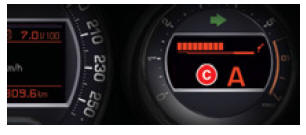
Instrument cluster displays
The selector position and driving mode are shown on the dial C of the instrument cluster.
A position gate associated with the selector also shows the selected position.
Starting the vehicle- To start the engine, the selector must be in position N.
- Press the brake pedal fully.
- Operate the starter.
N appears on the instrument cluster display.
N flashes on the instrument cluster, with an audible signal and a message on the multifunction display, if the gear selector is not in position N when starting.- Select first gear (position M or A) or reverse (position R).
- Release the parking brake, unless it is set to automatic mode.
- Release the brake pedal, then accelerate.
- With your foot on the brake, push the lever forward.

Engage reverse only when the vehicle is stationary.
To avoid a jolt, do not accelerate suddenly after selecting a gear.
Neutral Never select
N while the vehicle is moving.
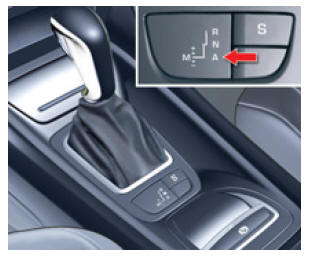
Automatic operation
- Move the selector to position A.
The gearbox continuously selects the gear best suited to the following parameters:
- driving style,
- road profile,
- vehicle load.
For maximum acceleration, for example when overtaking another vehicle, press the accelerator pedal firmly and go past the detent point.
Manual gear selectionThis temporary gear change allows you to overtake, for example, while remaining in automated mode.
- Operate the + or - steering wheel paddles.
The gearbox engages the requested gear if engine speed allows it.
After a few moments without any action on the controls, the gearbox again manages the gear ratios automatically.
Manual operation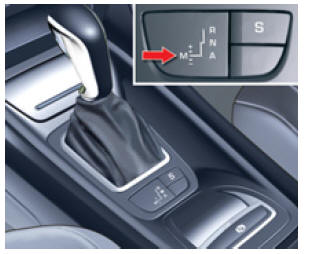
Manual operation
- Move the selector to position M.
Gear change requests are only carried out if engine speed allows it.
It is not necessary to release the accelerator pedal during gear changes.
When braking or slowing down, the gearbox downshifts automatically so that the vehicle can pull away in the correct gear.
The SPORT programme has no effect in sequential operation.
During hard acceleration, the next higher gear will not engage without the driver operating the steering wheel paddles. While the vehicle is moving, never select neutral N. Engage reverse R only with the vehicle stationary and your foot on the brake pedal. SPORT programme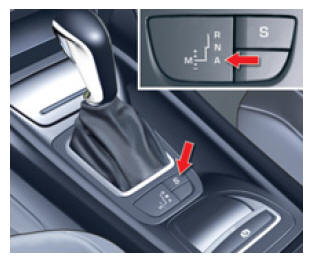
SPORT programme
- With the selector on A and the engine running, press the S button to activate the SPORT programme for a more dynamic driving style.
S appears on the instrument cluster.
- Press the S button again to deactivate it.
S then disappears from the instrument cluster display.
Stopping the vehicleBefore switching off the engine, you can choose to:
- move to position N to be in neutral,
- leave the gear engaged; in this case, the vehicle cannot be moved.
In both cases, you must apply the parking brake to immobilise the vehicle, unless it is programmed in automatic mode.
! If the vehicle is stopped with the engine running, always put the gear selector in neutral N.
Before working in the engine compartment, check that the gear selector is in neutral N and that the parking brake is applied. Operating faultWith the ignition on, AUTO flashing, with an audible signal and a message on the multifunction display, indicates a gearbox fault.
Have it checked by the CITROËN network.
You must press the brake pedal when starting the engine.
In all parking situations, always apply the parking brake to immobilise the vehicle, unless it is set to automatic mode.
Test yourself
A quick Citroen C5 quiz: every answer comes with an explanation and a link to the manual page.