Audio and telematics
CarPlay
In this manual: Audio and telematics
~1min read
Connecting CarPlay smartphones
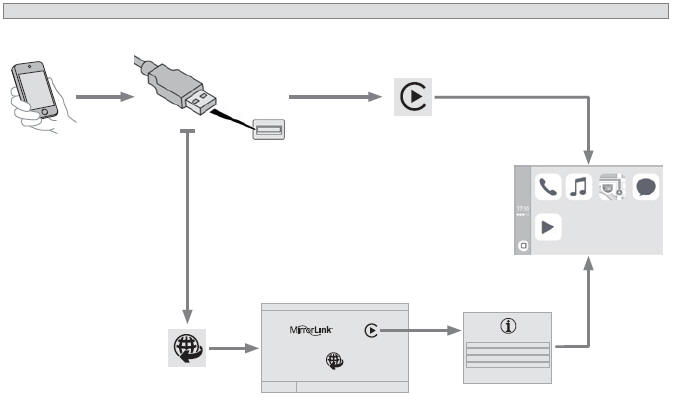
For safety reasons, and because it requires the driver's constant attention, using a smartphone while driving is prohibited. Carry out these operations with the vehicle stationary. Smartphone synchronisation allows users to display apps adapted for CarPlay technology from the smartphone on the vehicle screen. Standards and rules are subject to continuous development; it is recommended that you update your smartphone's operating system. To see the smartphone models available for selection, go to the brand's website for your country. For safety reasons, apps can only be used when the vehicle is stationary. When driving resumes, the information they display is interrupted. Connect the USB cable. The smartphone
is in charging mode when connected with the USB cable.
 When connected via USB cable, the "Phone" function
switches to the "CarPlay" function in the menu carousel.
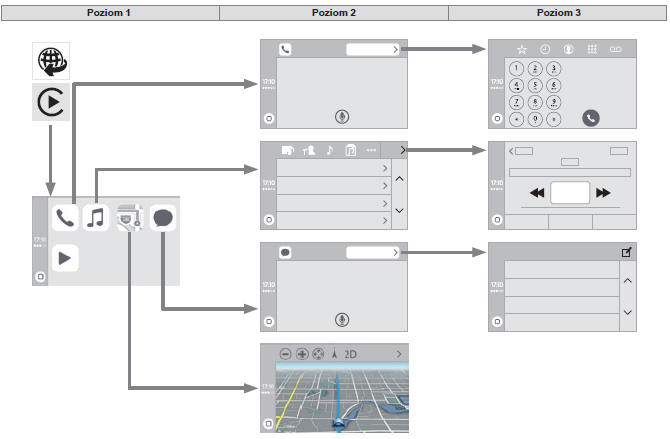
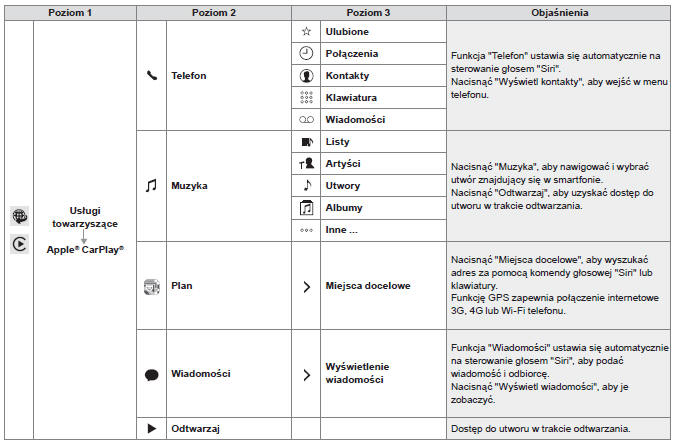
Press "CarPlay" to display the CarPlay interface.
or
 Connect the USB cable. The smartphone
is in charging mode when connected with the USB cable.
 Press "Connected services"
from the system to display the home page.
 Press " CarPlay " to
display the CarPlay interface.
Voice recognition
Press the end of the light switch stalk to activate the smartphone's voice recognition function via the system.
Test yourself
A quick Citroen DS3 quiz: every answer comes with an explanation and a link to the manual page.
Was this page helpful?