Android Auto™
Use this QR code to access the digital experience.
Android Auto™ is a feature of your Uconnect system that requires an Android™ 5.0 or higher smartphone with a data plan, and allows you to project your smartphone and a number of its apps onto the radio touchscreen. Android Auto™ provides useful information and organizes it in simple cards that appear only when needed. Android Auto™ can be used with voice technology, steering wheel controls, the radio faceplate knobs and buttons, and the radio touchscreen to control many of your apps. To use Android Auto™, follow these steps:
NOTE:
Feature availability depends on your wireless carrier and mobile phone manufacturer. Some Android Auto™ features may or may not be available in every region and/or language.
- Download the Android Auto™ app from the Google Play Store to your Android™ smartphone.
- Connect your Android™ smartphone to one of the media USB ports in your vehicle. If the Android Auto™ app has not been downloaded, the device will begin the download when first connected. Your vehicle must be in PARK when using the app for the first time.
NOTE:
Be sure to use the USB cable supplied with the phone, as aftermarket cables may not work.
NOTE:
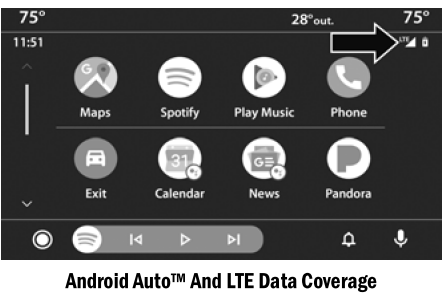
To use Android Auto™, make sure you are within a cellular coverage area. Android Auto™ may use cellular data, and your cellular network coverage is shown in the upper right corner of the radio screen. Data plan rates apply.
- Once the device is connected and recognized, drag and drop the phone icon from the menu bar onto the Android Auto™ icon.
NOTE:
Android Auto™ starts automatically once a compatible device is connected. You can also start it by pressing the Android Auto™ icon on the touchscreen.
Once Android Auto™ is installed and running on your Uconnect system, the following features are available for use with your smartphone data plan:
- Google Maps™ for navigation
- Google Play Music, Spotify, iHeartRadio, etc. for music
- Hands-free calling and text messaging for communication
- Various compatible apps
Test yourself
A quick Dodge Charger quiz: every answer comes with an explanation and a link to the manual page.