Drive Mode Set-Up
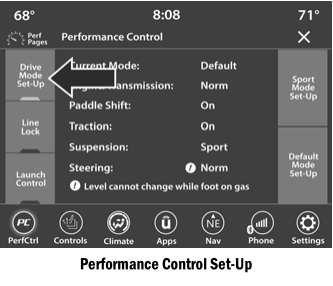
Pressing the Drive Mode Set-Up button on the touchscreen in the Performance Control screen shows the real-time status of various systems. Pressing the Sport Mode Set-Up, Drag Mode Set-Up (1320 only) or Default Mode Set-Up button on the touchscreen allows the driver to customize Performance Control and see how these configurations affect vehicle performance.
NOTE:
Not all options listed in this manual are available on every vehicle. The table below lists all available Performance Control configurations.
Available Mode Configurations

For a detailed description of their operation, refer to the "Sport Mode" and "Default Mode" sections.
NOTE:
These settings remain in effect when using the Launch Control function.
Test yourself
A quick Dodge Charger quiz: every answer comes with an explanation and a link to the manual page.